English Version
Have you ever found yourself glancing at the Microsoft Team window on your (second) screen, just to keep track whether a colleague or another contact becomes available, so you can start firing your question(s) at him or her? Guilty as charged over here!
Now, Microsoft Teams has a nice little feature added for this called “Notify when available”. It works like this:

In the Teams main window, click the 3 dotted menu on the contact that you wish to speak to as soon as possible and select “Notify when available”.

You are now presented with a screen that shows that you are now following the presence of your contact.

When your contact changes his or her status to available, you’ll receive a message that states that your contact is now available. Note that you don’t get any message if your contact changes the status from “offline” to busy, do not disturb, be right back etc!
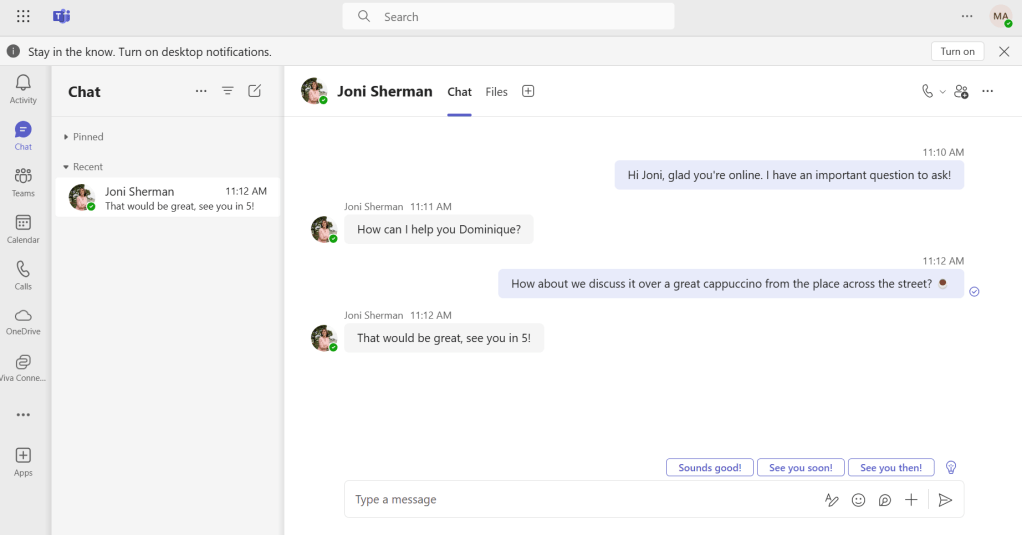
So now you can start asking your very important question, like it did with Joni.

When Joni goes offline, you are also notified of this fact. It’s import to know that you keep being notified when your contact goes offline or comes online until you turn it off. So it’s not a one time setting!
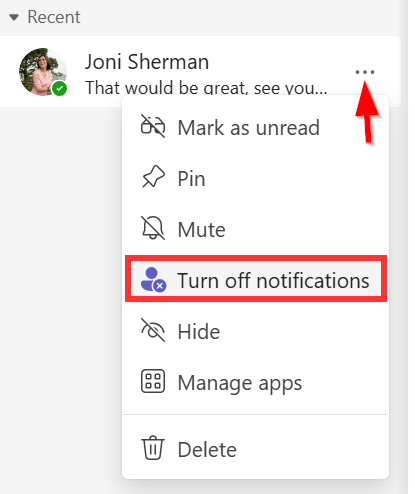
You can turn it off by going into the 3 dotted menu again and selecting “Turn off notifications”. You are notified that you are no longer following the presence of your contact. Note that this only turns off notifications for the presence of this person (online / offline). Notifications when you are being messaged or mentioned by this person are not affected. So the text to turn off this feature could be improved if you ask me!
Hope you found this Quick Productivity Tip useful!
Nederlandse versie
Heb je jezelf er al eens op betrapt dat je blijft kijken naar het Teams venster op je (tweede) scherm, zodat je er meteen bij bent als een collega of een andere contactpersoon online komt en je degene meteen kunt bestoken met je vraag? Klinkt mij in ieder geval bekend in de oren!
Microsoft Teams heeft hiervoor een nieuwe feature geintroduceerd genaamd “Melden wanneer beschikbaar”. Het werkt als volgt:
Klik in het Teams scherm op het menu met de 3 puntjes naast je contactpersoon die je zo snel mogelijk wilt spreken en selecteer “Melden wanneer beschikbaar”.
Je wordt er nu van op de hoogte gebracht dat je nu de aanwezigheid van je contactpersoon volgt.
Als je contactpersoon zijn of haar status verandert naar “beschikbaar” dan zul je een melding krijgen die gelijk is aan bovenstaande. Deze melding krijg je alleen als de contactpersoon “beschikbaar” is, dus niet als de status verandert van offline naar bezet, niet storen, zo terug etc!
Nu je contactpersoon online is kun je je belangrijke vraag stellen, zoals ik in het voorbeeld hierboven heb gedaan aan Joni.
Als Joni offline gaat wordt je hier ook van op de hoogte gesteld. Het is belangrijk te weten dat je vanaf nu op de hoogte wordt gehouden als je contactpersoon online komt of offline gaat tot je deze functie weer uitschakelt. Dit is dus geen instelling die maar 1 keer wordt toegepast!
Je kunt de meldingen weer uitschakelen door wederom te klikken op het menu met de 3 puntjes en te kiezen voor “meldingen uitschakelen”. Ook nu wordt je weer op de hoogte gesteld dat je de aanwezigheid van deze persoon niet meer volgt. Let op dat dit enkel de notificaties uitschakelt voor de aanwezigheid van deze persoon (online / offline). Notificaties wanneer je een bericht ontvangt of wordt getagged door deze persoon worden hier niet door beïnvloed. De tekst om deze feature uit te schakelen is dus voor verbetering vatbaar wat mij betreft!
Ik hoop dat deze tip nuttig voor je was!

 DominiqueHermans.com