Up to now, the ‘Protect Your Microsoft 365 Data in the Age of AI’ series consists of the following posts:
- Protect your Microsoft 365 data in the age of AI: Introduction
- Protect your Microsoft 365 data in the age of AI: Prerequisites
- Protect your Microsoft 365 data in the age of AI: Gaining Insight (This post)
Now, with the introduction and prerequisites being taken care of, we can focus on the first objective in this blog series which -if you might remember- is the following:
Create insight in the use of GenAI apps in our company.
While this is possible by leveraging Microsoft Defender for Cloud Apps, we’re going to take this one step further and use Microsoft Purview Data Security Posture Management for AI (DSPM4AI) to also create insight on which sensitive data is shared with GenAI apps.
Creating policies
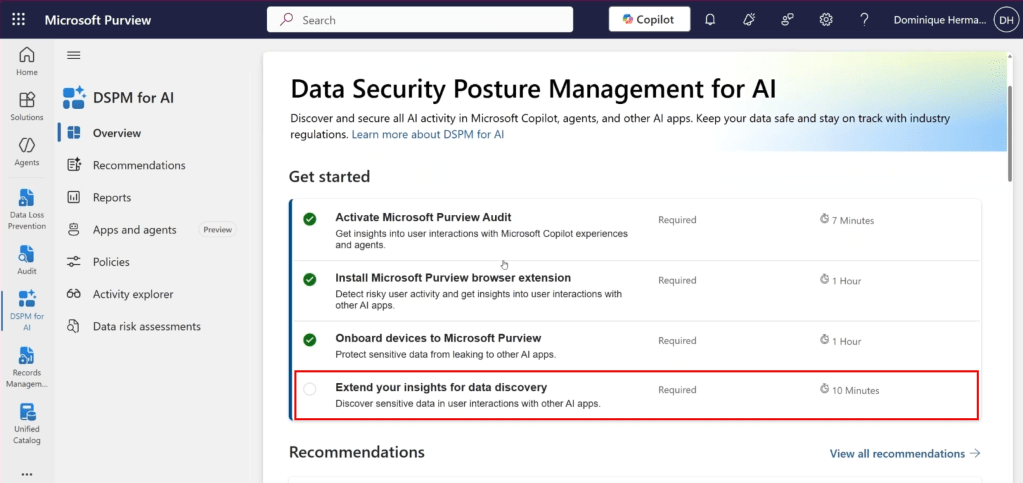
Let’s dive back into the Purview console and start where we also started with our previous article in this series. The DSPM4AI console. While we satisfied all the prerequisites in our previous article, we can see in the screenshot above that 1 tick box is still missing that satisfying green checkmark. And that’s the one we are going to enable right now.
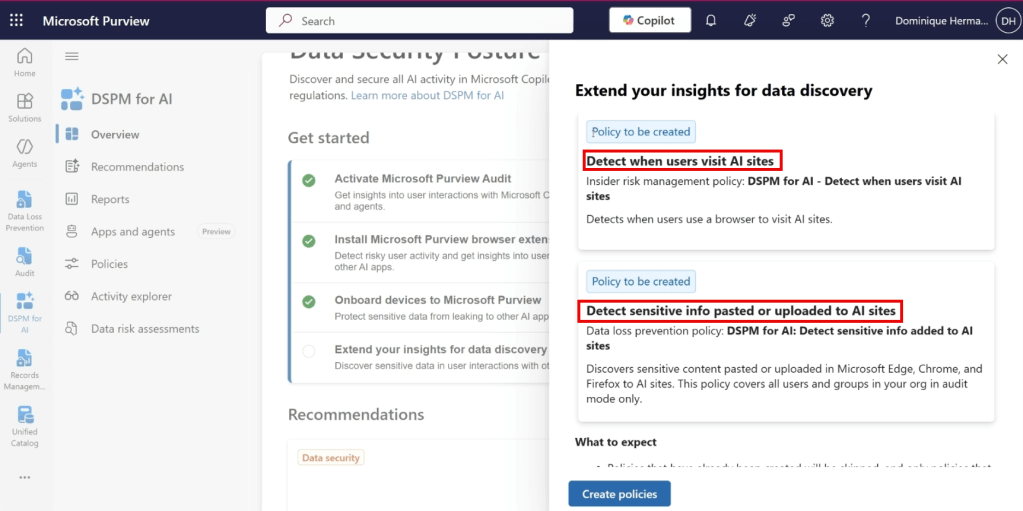
It allows us to extend our insights for data discovery and specifically; the use of generative AI apps in our organization. As can be seen in the screenshot above, it takes the manual creation of policies out of our hands by creating an Insider Risk Management policy that allows us to detect when users use a browser to visit AI sites and also creates an endpoint Data Loss Prevention (eDLP) policy that allows us to capture when and which sensitive information is pasted or uploaded to AI sites. Let’s create both policies and check out what’s under the hood.
Insider Risk Management Policy ‘DSPM for AI – Detect when users visit AI sites’

When navigating to the Insider Risk Management module and clicking the ‘policies’ pane, we can see that the DSPM for AI policy called ‘DSPM for AI – Detect when users visit AI sites’ is created. Let’s see what it’s properties are by clicking the ‘edit policy’ button.
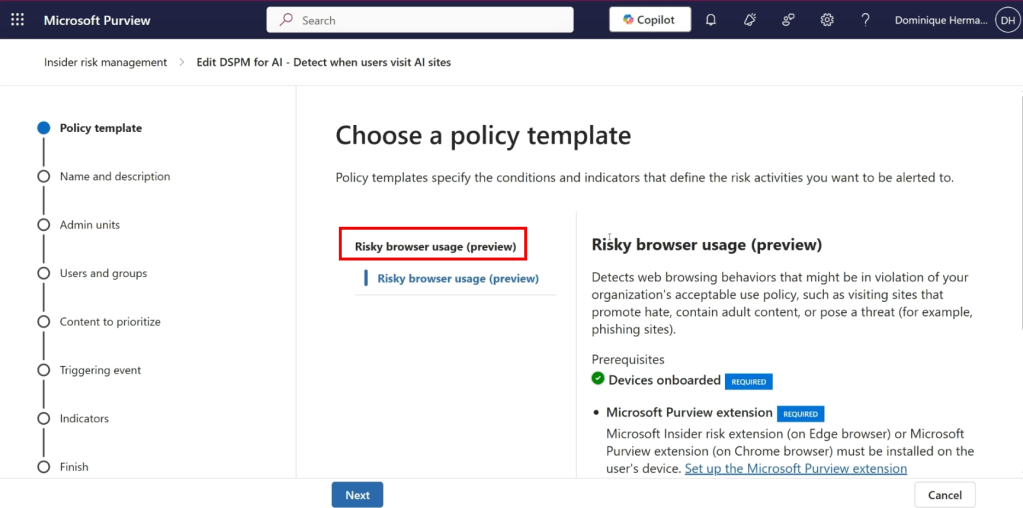
For starters, we can see that the policy is based on the ‘Risky browser usage’ template, which in time of writing this blog is still in preview. We can also see that various prerequisites have to be in place before we can benefit from this policy:
- Our devices have to be onboarded to Microsoft Purview (already taken care of in the prerequisites article)
- The Microsoft Purview extension must be installed on the end-user’s device (already taken care of in the prerequisites article)
- At least one browsing indicator must be selected (not in screenshot, prerequisite will be satisfied in the policy itself)
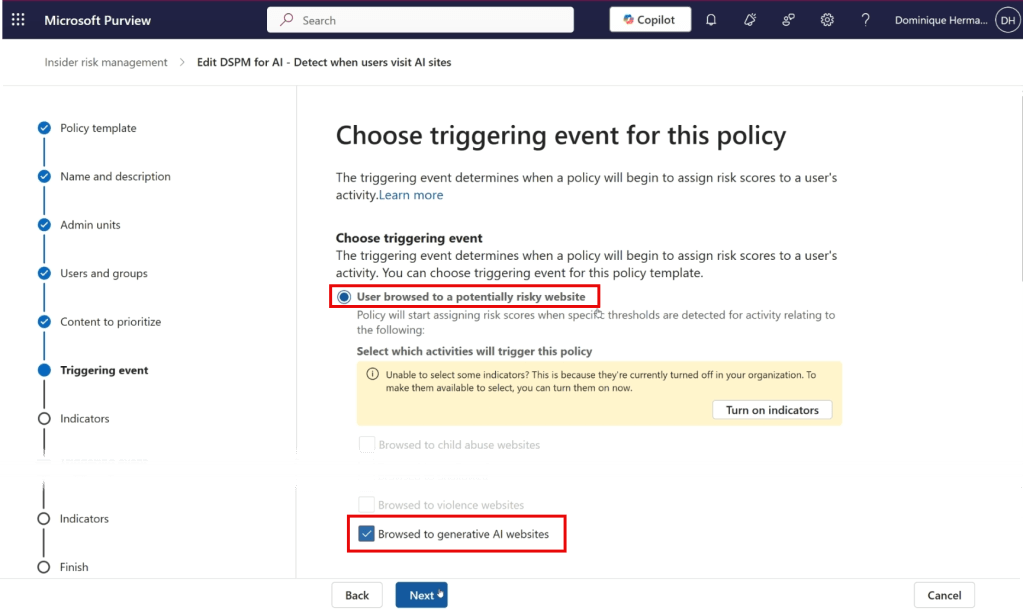
As we make our way to the ‘triggering’ event screen, we can see that this policy is triggered when a user browses to a potentially risky website. When scrolling down, we can see that the chosen category is ‘generative AI websites’. This category consists of a list that is maintained by Microsoft that holds all GenAI sites currently supported by this policy. Note that when leveraging IRM for actual Insider Risk cases, the triggering event will start assigning risk scores to a user. While this functionality can be leveraged with DSPM for AI, this is not the case in the policy that we’re creating in this article. It’s used only to create insight.
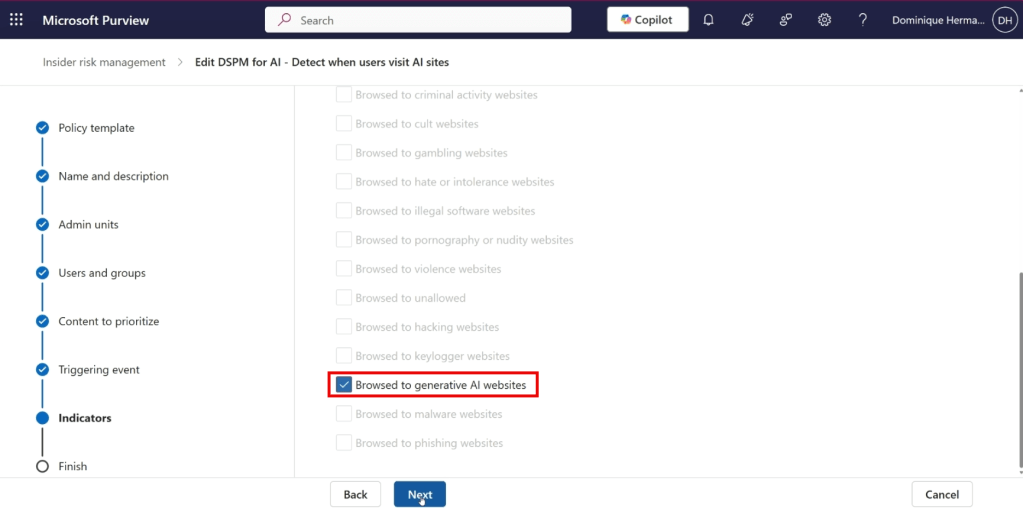
When moving forward in the wizard, the indicator that is configured is ‘Browsed to generative AI websites’. When the indicator is matched, alerts are being generated which can be reviewed later in the IRM console.
Endpoint Data Loss Prevention Policy ‘Detect sensitive info added to AI sites’

When navigating to the Data Loss Prevention solution in Purview, we can see that there is a policy created called ‘DSPM for AI: Detect sensitive info added to AI sites’. Let’s dive in and see what this does for us.
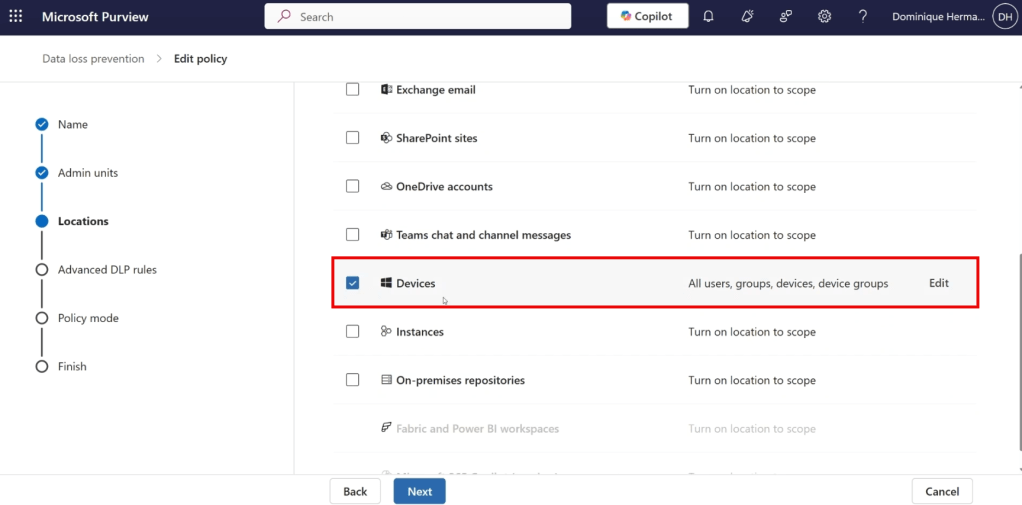
As it is an Endpoint DLP policy, the policy is scoped to all devices in your organization.

Now for this interesting part, the DLP policy rules. As we can see in the screenshot above, the rule audits sensitive data that’s shared to generative AI sites based on Sensitive Information Types (SIT’s). To prevent false positives and the clouding of the insights being generated, I recommend removing SITs from the list that are not applicable to your organization.
Also, do include custom SITs that you’ve created to detect company-sensitive information. In this specific case, we’ll add a custom SIT that’s created to detect information on the Star Wars franchise as one of the objectives in this series was that no references should be made to the Star Wars movie franchise.
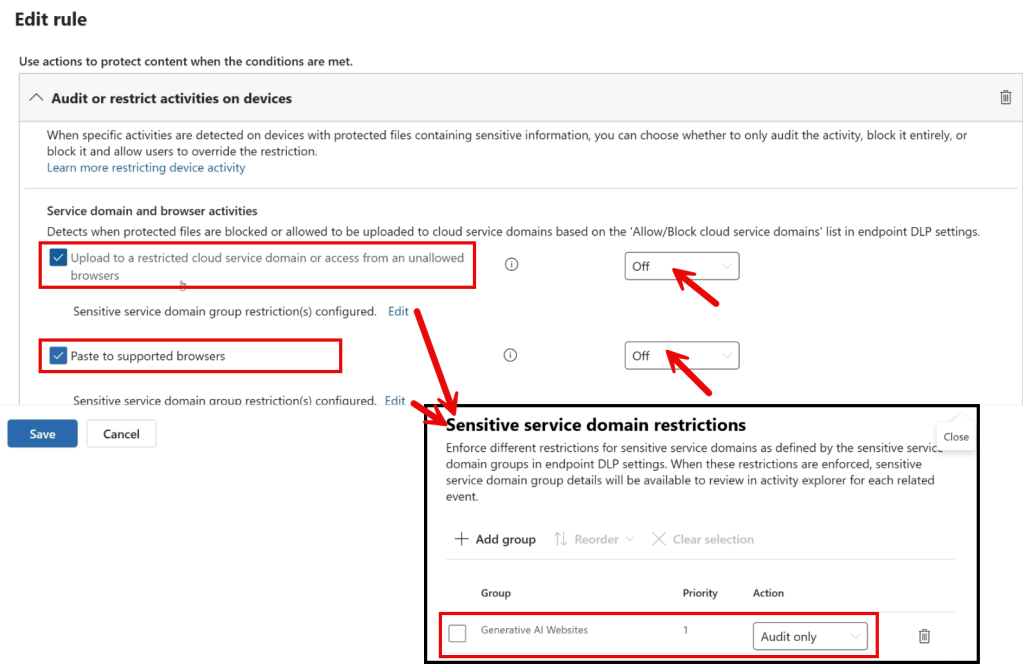
By further examining the policy through its properties, we can see what is actually meant by ‘data shared to generative AI sites’. As shown in the image above, monitoring is in place for data uploaded to restricted cloud service domains and data pasted into supported browsers. Although no settings are enforced at the top level (both activities are set to ‘off’), we gain more insight by looking at the sensitive service domain restrictions. Here, we see that the settings apply only to the group ‘generative AI websites’ and that the configured action is ‘audit only’. This audited data works great as a source for the insight we are trying to gain.

The ‘generative AI websites’ mentioned are part of a so-called ‘sensitive service domain group’. You can configure this yourself in the DLP settings by navigating to ‘Settings’, ‘Data Loss Prevention’, ‘Browser and domain restrictions to sensitive data’, ‘sensitive service domain groups’ after which it can be used in your policies. However, the sensitive service domain group ‘Generative AI Websites’ is maintained by Microsoft, ensuring that newly emerging generative AI websites are automatically included in your policy. This is, of course, useful in a world where generative AI websites are proliferating rapidly.
The full list of supported generative AI websites can be viewed by clicking the link icon, which redirects you to Microsoft Learn. At the time of writing this article, the list contains 493 generative AI websites.
Visualizing the results

Once sufficient logging has been collected over a certain period through Insider Risk Management logs and Endpoint DLP information stored in the audit log, the results can be reviewed. To obtain a helicopter view of the data, navigate to the DSPM for AI solution and click on ‘Reports’. Here, you will find an overview of generative AI websites visited within your organization (thanks to the Insider Risk Management Policy), as well as interactions with generative AI websites that involve sensitive data or may be considered unethical (thanks to the Data Loss Prevention Policy).

This information can then be used to gain insight into the use of generative AI applications within your organization. You can subsequently use this information to develop or refine your policy on generative AI use. With this, we have fulfilled the first requirement in this blog series: creating visibility into the use of Gen AI apps in our organization!

 DominiqueHermans.com
5 thoughts on “Protect your Microsoft 365 data in the age of AI: Gaining Insight”