Up to now, the ‘Protect Your Microsoft 365 Data in the Age of AI’ series consists of the following posts:
- Protect your Microsoft 365 data in the age of AI: Introduction
- Protect your Microsoft 365 data in the age of AI: Prerequisites
- Protect your Microsoft 365 data in the age of AI: Gaining Insight
- Protect your Microsoft 365 data in the age of AI: Licensing (This post)
Every series has at least one episode that you feel was the weakest of the bunch; however, the series would not be complete without it. The same applies to this post. Although it is, of course, much more enjoyable to delve into the technical aspects, we must also address the more essential matters, such as licensing in this case. After all, before you begin protecting your data in the age of AI, you naturally want to know what it will cost you, so that you can perhaps draft a business case.
In the case of protecting your Microsoft 365 data in the age of AI, we’ll have to deal with 2 types of licensing models, which we’ll talk about in the next chapters.
Per-user licensing model
This is the actual subscription-based license that grants you the right to use Microsoft 365 services, and in this case, Microsoft Purview and Microsoft Defender for Cloud Apps.
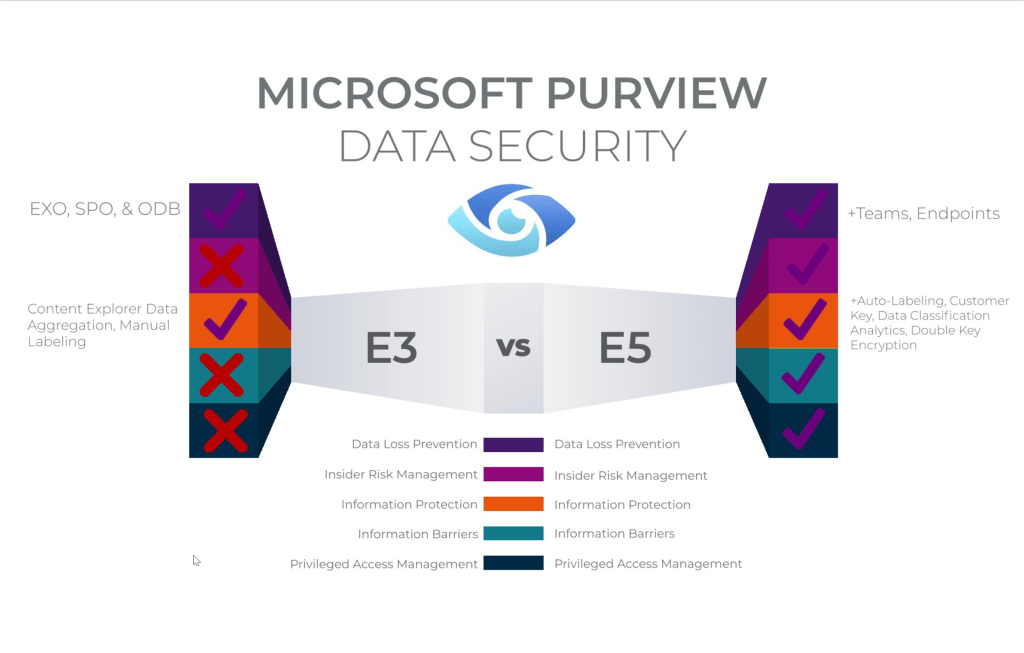
In case of Microsoft Purview Data Security Posture Management for AI (DSPM4AI), we have to keep in mind that it doesn’t have a permission structure of it’s own. As it leverages solutions already present in Microsoft Purview, you’ll have to have a license for those solutions. As you can see in the picture above, a Microsoft 365 E3 license does grant you the right to use Data Loss Prevention (DLP) on Exchange Online, SharePoint Online and OneDrive for Business, however DLP for Teams and Endpoints isn’t included. The same goes for some components of Information Protection (auto-labeling, customer key, data classification analytics, double key encryption) and also, Insider Risk Management (IRM), Information Barriers and Privileged Access Management (PAM) are features that are only to be found on the E5 side.
The following (combination of) licenses would grant us the right to use all features available in DSPM4AI:
- Microsoft 365 E5
- Microsoft 365 E3 with Microsoft 365 E5 compliance add-on
- Microsoft 365 E3 with Microsoft 365 E5 Information Protection & Governance and Microsoft 365 E5 Insider Risk Management add-ons.
- Microsoft Purview Suite for Business Premium, although since this offering is only 1,5 weeks old, it does not mention specifically that Endpoint DLP is included.
If you want a detailed view on all licenses and Purview components available in those licenses, take a look at the Microsoft 365 Compliance Licensing Comparison.
Microsoft Defender for Cloud Apps (MDfCA), which we’ll also leverage in this series, can be found in:
- Enterprise Mobility + Security E5
- Microsoft 365 E5
- Microsoft 365 E3 with Microsoft 365 E5 Security
- Microsoft 365 E3 with Microsoft 365 E5 Compliance
- Microsoft 365 E3 with Microsoft 365 E5 Information Protection and Governance
- Microsoft Defender Suite for Business Premium
So my advice here would be to go with Microsoft 365 E5 or Microsoft 365 E3 with Microsoft 365 E5 Compliance add-on. Do note that each user benefiting from the service should have a license assigned.
Pay-as-you-go (PAYG) billing

Remember those cool graphs that also showed insight on the use of 3rd party generative AI applications? That’s exactly where Pay-as-you-go (PAYG) billing comes into play. Microsoft Learn tells us the following about gaining insight on these 3rd party GenAI apps:
For AI apps other than Microsoft 365 Copilot and Microsoft Facilitator, you’ve set up pay-as-you-go billing for your organization. When this billing model is applicable for specific configurations, you’ll see notifications and instructions in the UI.
But what does this mean and what are we paying to gain insight?
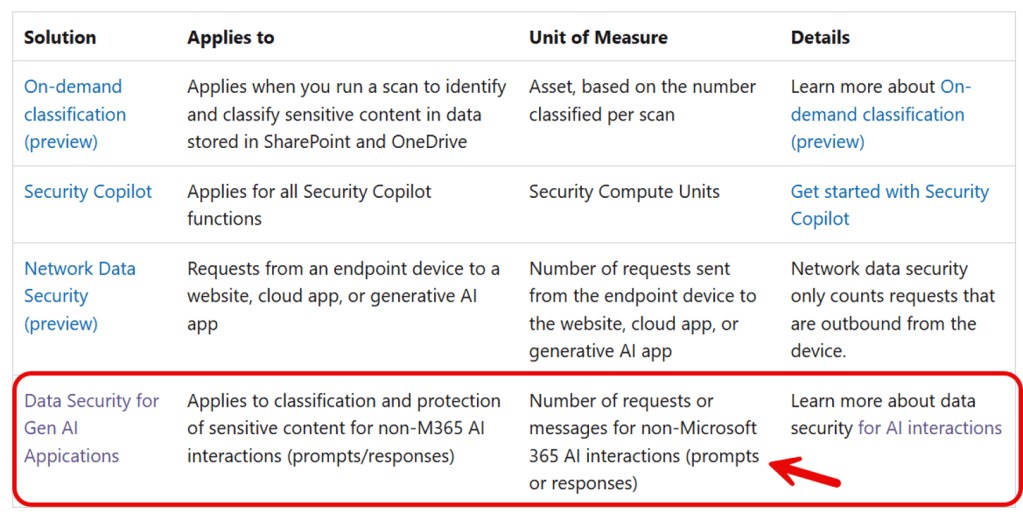
The answer can be found in the table above. The solution ‘Data Security for Gen AI Applications’, which applies to ‘classification and protection of sensitive content for non-M365 AI interactions (prompts/responses’) has ‘Number of requests or messages for non-Microsoft 365 AI interactions (prompts or responses) as it’s unit of measure. But what does this mean exactly?
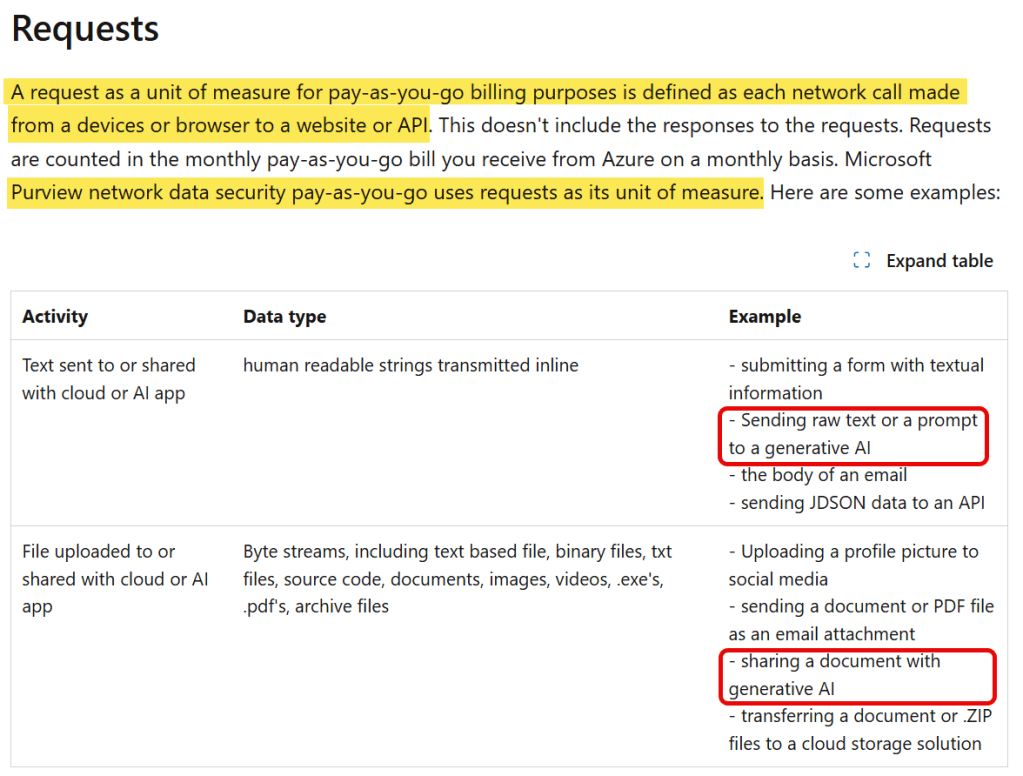
When digging a little deeper we can find that a request is defined as ‘each network call made from a device or browser to a website or API. This doesn’t include the responses to the request’. Activities are text sent to or shared with cloud or AI apps or files uploaded to or shared with cloud or AI apps. This can be a prompt sent to ChatGPT for example, or a document shared with Google’s Gemini.
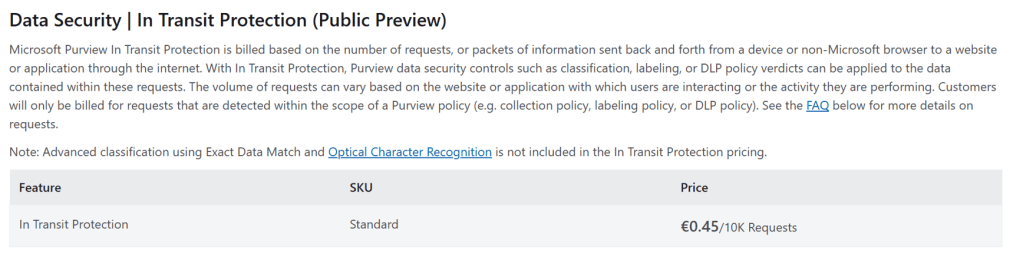
The actual costs at time of writing of this article are €0,45 per 10.000 requests. So this means that a combination of 10.000 prompts and images (for example) can be shared with GenAI sites for €0,45. For actual pricing, take a look at the above linked Microsoft Azure Documentation.

 DominiqueHermans.com
4 thoughts on “Protect your Microsoft 365 data in the age of AI: Licensing”