Let Teams notify you when a contact becomes available

English Version

Naar Nederlandse versie

Have you ever found yourself glancing at the Microsoft Team window on your (second) screen, just to keep track whether a colleague or another contact becomes available, so you can start firing your question(s) at him or her? Guilty as charged over here!

Now, Microsoft Teams has a nice little feature added for this called “Notify when available”. It works like this:

In the Teams main window, click the 3 dotted menu on the contact that you wish to speak to as soon as possible and select “Notify when available”.

Continue reading “Let Teams notify you when a contact becomes available”

How Semantic Index for Microsoft 365 Copilot connects you to relevant information

When seeing Microsofts Copilot for Microsoft 365 (hereafter just called “Copilot”) in action the first time, it looks a little bit like magic. How can it be that Copilot can provide you with relevant information based on your query? Let’s dive into this in this article.

Copilot Components

To provide you with answers based on your questions and help you to be more productive in Microsoft 365 apps, Copilot uses a couple of technologies:

  1. The Microsoft 365 apps you use every day like Word, Excel, PowerPoint, Outlook and Teams for example. Copilot in each app is tailored to assist you in the context of that app.
  2. Microsoft Copilot with Graph-grounded chat let’s you query copilot to answer your questions, draft or rewrite content or catch up on what you missed in Teams meetings.
  3. Large Language Models (LLMs) in Microsoft 365 Copilot are AI algorithms that use deep learning techniques and big amounts of data sets to understand, summarize, predict and generate content. Copilot uses pre-trained models like GPT-4 and GPT-4 Turbo from OpenAI for example. Note that these models are running in your own Microsoft 365 / Azure environment that reside in your own service boundary. Also, Microsoft is very clear that your data is not being used to train the foundational model, like in this example GPT from OpenAI.
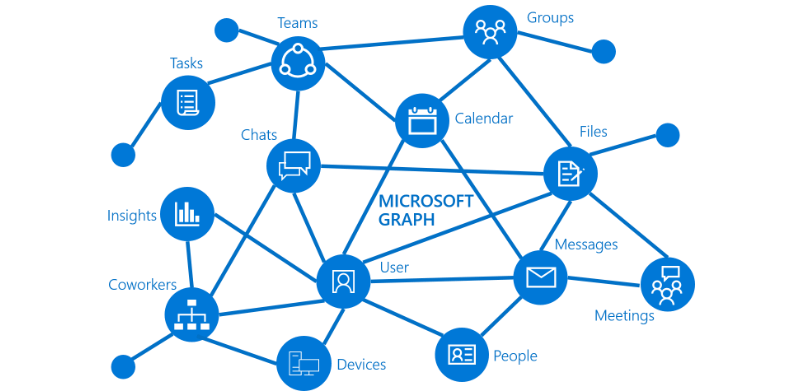
  4. Microsoft Graph combines all your data and intelligence in your Microsoft 365 environment and publishes this information via a so-called Application Programming Interface (API) so it can be accessed by anyone with the correct permissions. The same API can be used by developers to write applications that in turn can access that same information. Take a look at the following picture to see a more visual representation of the Microsoft Graph:
Image credit: Microsoft
Continue reading “How Semantic Index for Microsoft 365 Copilot connects you to relevant information”

The meeting follow response in Outlook explained

English Version

Naar Nederlandse Versie

Maybe you are familiar with the purple “tentative” button in Outlook with which you can respond to a meeting request. Personally I often wonder about the function of this button. The meeting organizer still doesn’t know whether you are attending the meeting or not. 

When you are invited as an optional attendee and thus you are not mandatory, it could serve it’s function. 

In the upcoming period, a new button called “follow” will be added as a new button. The goal of this button is to inform the organizer of the meeting that you will not attend, but that you will follow up on the meeting later. This is especially handy when you have Copilot for Microsoft 365 at your disposal because with “follow”, you get access to the meeting components like recorded video, notes, meeting chat and transcript. A number of options to follow up on the meeting later are:

Continue reading “The meeting follow response in Outlook explained”

How to create an In-Person Event in Outlook

English Version

Naar Nederlandse Versie

This article marks the start of a new series of blog posts called “Quick Productivity Tips (QPT)”. These articles will be available in both English and Dutch to make it easier for visitors to understand and implement this quick productivity tips (QPT).

In this first article, let’s see how to create an in-person event in new Outlook and Outlook on the Web!

Microsoft recently introduced the possibility to set an event as an “in-person” event. This works in new Outlook and Outlook on the Web.

Continue reading “How to create an In-Person Event in Outlook”

Microsoft Entra B2B Collaboration vs B2B Direct Connect explained

B2B (Business to business) connections in Microsoft Entra can be used to connect with external parties so you can collaborate on projects without having to have an account in 1 Microsoft Entra environment.

The recent introduction of Microsoft Entra B2B Direct Connect came with some confusion in security settings, what boundaries can be set between organizations and what the difference is in usage for end-users in for example Microsoft Teams. In this blog, I will explain both variations of Microsoft Entra B2B connections, their differences and which one you should use in what scenario. Are you ready? Let’s go!

Continue reading “Microsoft Entra B2B Collaboration vs B2B Direct Connect explained”

Microsoft Purview 101: Using Adaptive Scopes

In the previous post I talked about retention policies and how you can apply them to your environment. To keep things simple, I used static scopes in that article. But since adaptive scopes are the recommended approach for retention policies I want to show you what they can do, and why Microsoft recommends them to be used instead of static scopes.

Continue reading “Microsoft Purview 101: Using Adaptive Scopes”

Microsoft Purview 101: Data Lifecycle Management (DLM)

One of the core features of Microsoft Purview is Data Lifecycle Management (DLM), formerly known as Microsoft Information Governance. DLM is all about providing you with the tools you need to keep information that you need, and delete the information that you don’t. This process is of great importance for compliance with regulations, risk management en liability management.

Data Lifecycle Management in Microsoft Purview has a great overlap with Records Management, although they also have their differences. However this is something for another article. This article will explain how to configure the basics of Data Lifecycle Management, and will show you the end-user experience.

Continue reading “Microsoft Purview 101: Data Lifecycle Management (DLM)”

Get your focus back with Viva Insights Focus Timer

Remember that time where you could start your PC, open Microsoft Word and could start being productive without being disturbed by Microsoft Teams calls, chat messages, new emails coming in, popups from coworkers that mention you and upcoming event messages just to name a few? Well, that time is not coming back. (and Clippy 📎 isn’t either 😄)

But, what if I told you that you can get the same piece of mind to be just as productive as back in the day you started Word(Perfect) without being hooked up to the internet? With the use of focus timers you can!

Viva Insights features a focus timer to let you keep your focus (what’s in a name) on things that you have planned. Here’s how it works.

Continue reading “Get your focus back with Viva Insights Focus Timer”

Microsoft Purview 101: Down the rabbit hole with Information Barriers Configuration

Information Barriers in Microsoft 365 can be used to block (or allow) communication between groups of users and will apply to Teams, SharePoint and OneDrive. An example for a use case is a R&D department which may not communicate with the marketing department. The example used in this article is a multi-national company where users in the Netherlands are not allowed to communicate with users in Belgium because of high regulatory laws and requirements.

In this article, I will introduce you to Information Barriers in Microsoft Purview by walking you through setting up the backend and show you the impact it has on your users. Let’s go!

Setting the scene

For this demonstration, we are going to use the following employees in our fictional company:

  1. Allan Deyoung and Adele Vance, working in the Netherlands Office.
  2. Christie Cline and Megan Bowen, working in the Belgium Office.
Continue reading “Microsoft Purview 101: Down the rabbit hole with Information Barriers Configuration”

Microsoft Purview 101: How to use Compliance Manager to help improve data protection and comply to regulatory standards in Microsoft 365

Microsoft Purview has a pretty sweet feature called “Compliance Manager”. It can be used to assess your Microsoft 365 (and other non-Microsoft) environments based on various regulations like “ISO 27001” or you can create your own custom assessment that’s not based on a regulation. (Do note that at the time of writing this article, the creation of custom assessments is disabled due to an update of the process by Microsoft.)

Basics first, as always

Before we dive into the world of assessments and regulations, let’s start with the basic components of compliance manager:

Continue reading “Microsoft Purview 101: How to use Compliance Manager to help improve data protection and comply to regulatory standards in Microsoft 365”