At the time we began embracing the (public) cloud, we also started changing the way we safeguard our data. In the classic datacenter model, our data was buried deep within a datacenter that was separated from the outside world by using a firewall. It was your single entry point for accessing your companies data. Solutions to make your data accessible when away from the office was by using a VPN or other remote connection such as a Citrix or VDI environment.
Modern workplace environments don’t rely on the firewall anymore to protect data from being accessed by the outside world. We trust cloud providers to take care of the datacenter part and companies themselves are made responsible to safeguard their data. In this modern cloud approach the user account itself is at the center of accessing data. If anyone with bad intentions is able to get their hands on a username and password combination this gives them access to all the data the user has access to, for example in the Microsoft Cloud (Onedrive, Sharepoint, etc).
So we should make sure our users change their password periodically so bad people have a hard time guessing passwords right? Wrong.
Let’s start with some facts. Research1 shows that forcing your users to change their passwords periodically makes them even more prone to bad actors. This because it forces users to:
- Choose weaker passwords
- Update already used passwords
- Choose passwords with an incrementing number
So, why is it that despite the age of this research, we are still enforcing our users to change passwords today? (Take a look at this recent poll I posted on LinkedIn (dutch)) It of course would be ideal to get rid of passwords all together. But in my opinion, we are not there yet. There are still some platforms and applications that need to grow into the world of going passwordless. While it sure is possible in a modern Microsoft365 based environment, in real world scenario’s I still often see going passwordless (as in 100% passwordless and disabling using passwords) still has some drawbacks.
Let’s put this in a graphic form:
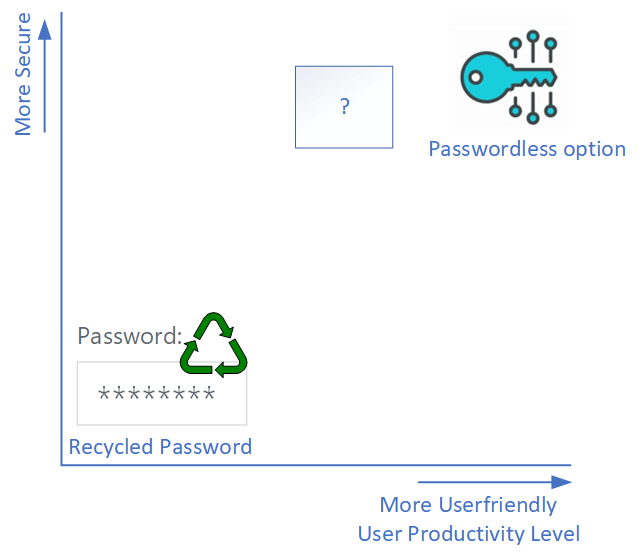
At this point we have our password that has to be periodically changed which is both unsecure and not user-friendly and at the other end of the spectrum our passwordless option. Why don’t we have something that is an in-between kind of solution you ask? Well, we have.
- In years past, I would advise you to disable legacy authentication, as it doesn’t play by the rules of the next solutions we would like to implement and ignores anything you would set up there. However, Microsoft has already disabled legacy authentication.
- Want to go fast with implementing more security? Enable Security Defaults for your Microsoft 365 tenant. At no additional cost, it enables MFA for your administrators and MFA-when-needed for your users. Also, it blocks legacy authentication.
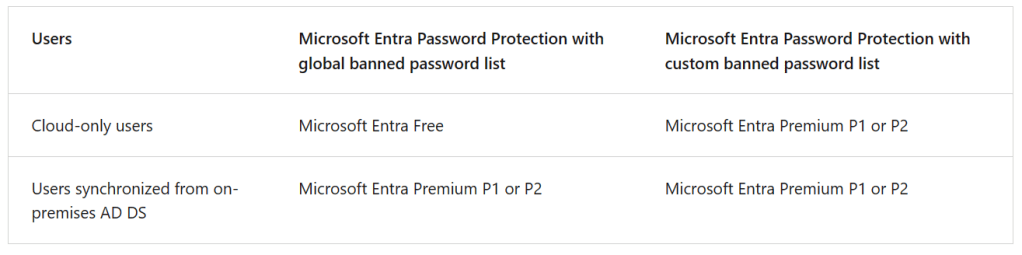
- Enable (custom) Banned Password Lists. Banned Password lists block users from using a password that is known to be easy to guess, weak or insecure. Note that the license requirement varies based on your scenario:
- Want to have more control over when users are challenged with MFA based on for example location or type of device? Configure Conditional Access. Do note that you will have to have a Microsoft Entra ID P1 license and Security Defaults will have to be turned off. Microsoft provides you with some nice templates to start off with. If you have a Microsoft Entra ID P2 license, you could add user and sign in risk-based policies to your Conditional Access Policies.
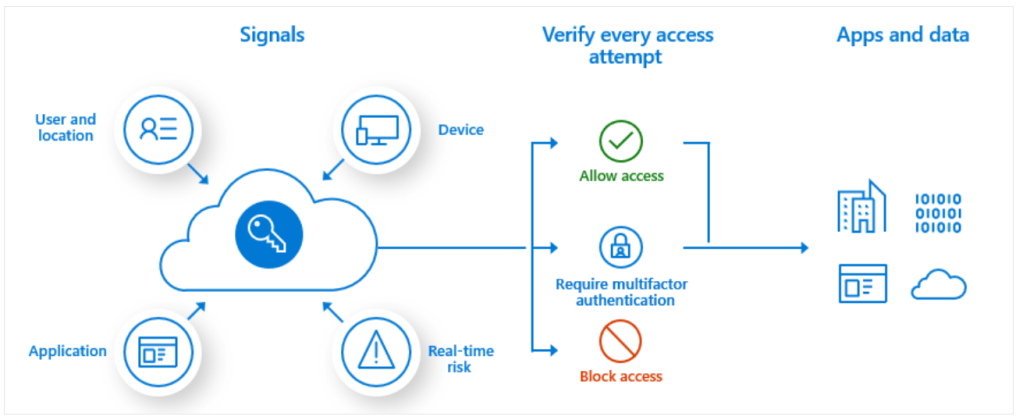
With these bullets as starting point, we can fill in the blank question mark in the graphic above until the time is here to go 100% passwordless. If you’re interested, take a look at the following articles for more information on the subject:
- The Windows Passwordless strategy explaining the 4 steps to password freedom.
- Your Pa$$word doesn’t matter – a blog on why the complexity of your users’ password doesn’t really matter.
- All your creds are belong to us! - a blog about the fact that MFA also can be broken by bad actors if the stakes are high enough.
I had a lot of fun writing this article and the fact that I now have something to point to when in a discussion about the need for users to change their passwords periodically. I hope you found it useful.

 DominiqueHermans.com