
In a previous post I talked extensively about using the newly introduced Data Loss Prevention (DLP) policy that can be scoped specifically at M365 Copilot interactions to prevent M365 Copilot from using sensitive labeled content. The post concluded with a table that clearly showed that the DLP policy alone did not suffice in keeping your sensitive information from being processed by M365 Copilot, as it only supports M365 Copilot chat based experiences. This is also clearly being communicated by Microsoft as the DLP policy is still in preview.
In the same posts conclusion, my advice was to combine the M365 Copilot DLP feature with other security measures like the removal of the EXTRACT permission. And that’s exactly what I put into practice over the last week. In this post, I want to show you the results of this test.
Configuration

What I did to configure this setup is fairly simple. First, create a sensitivity label. You can use my article on this as a starting point. However, make sure the configured sensitivity label applies access control (also known as encryption), as per the configuration in the above image. Click ‘Assign Permissions’ on the bottom of the screen.
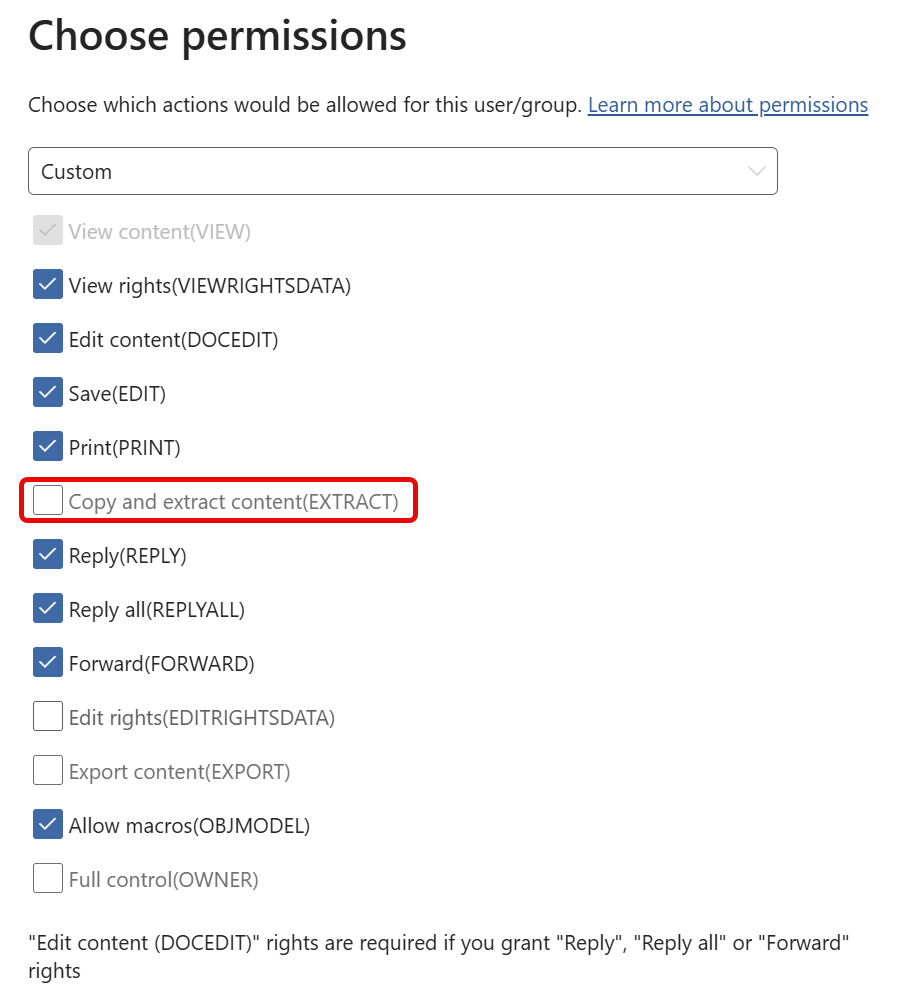
Now use a predefined template (Restricted Editor will do fine) or select custom and configure the permissions as per the screenshot above. Make sure the ‘Copy and extract content(EXTRACT)’ permission is disabled. According to Microsoft Learn, the definition of this permission is as follows:
“Enables options to copy data (including screen captures) from the document into the same or another document. In some applications, it also allows the whole document to be saved in unprotected form.”
After configuration of the access control properties, finish the wizard. Next, use this configured label in your M365 Copilot DLP policy as discussed in the previous article M365 Copilot DLP Policies in action, what can(‘t) they do?
The User Experience – Setting the stage

Just like in the previous article, I’m going to use the document about my favourite movie franchise of all time, Star Wars which, in this case, I have labeled with the ‘Test Copilot icm Extract Permissie’ label. This label is configured as in the above ‘Configuration’ chapter; with the M365 Copilot DLP rule AND the EXTRACT permission removed.
The User Experience – M365 Copilot Chat & Microsoft Word
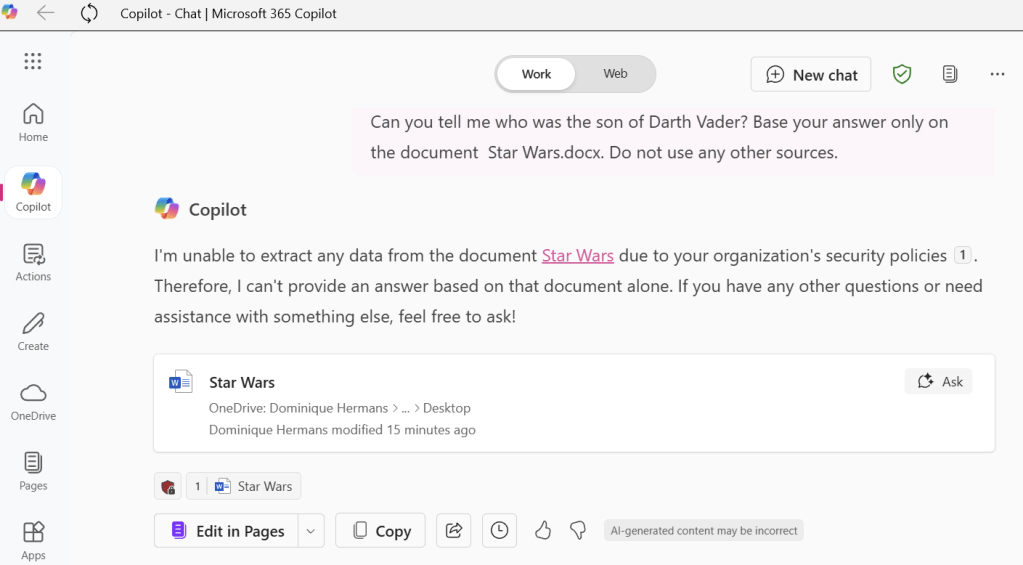
As expected, M365 Copilot chat still is restricted from using content from our Word document!
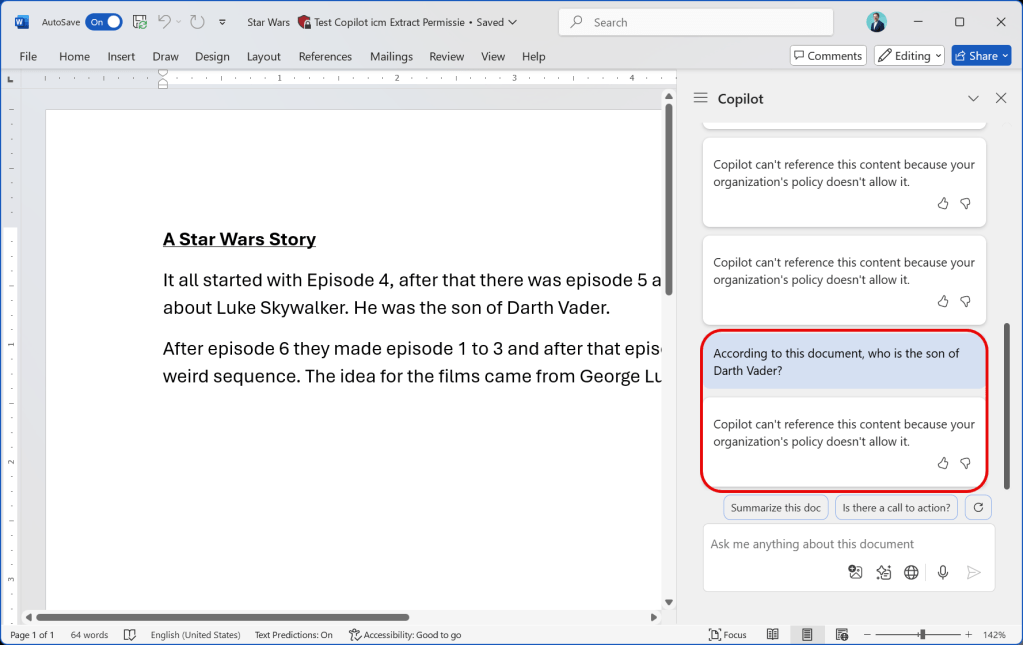
Now for the big test, as you might remember, Word didn’t comply very nicely to our DLP policy in the previous article. But when we combine the DLP policy with removal of the EXTRACT permission, it can’t use information from our Word document!
The User Experience – All Apps – A summary
Let’s take a look back at the behavior of each Office app when only applying the M365 Copilot DLP policy, as we did in the previous article. Y = M365 Copilot complies with the DLP policy and blocks content in it’s response. N = M365 Copilot does not comply with the DLP policy and shows blocked content in it’s response:
| M365 Copilot App | M365 Copilot in Edge | Word | Excel | PowerPoint | OneNote | Loop Page | Loop Component | Teams | |
|---|---|---|---|---|---|---|---|---|---|
| Copilot in Sidepane | Y | Y | N | Y | N | Y | Y | N | Y |
| Copilot button in App Canvas | N/A | N/A | N | N/A | N | Y | N | N/A | N/A |
To get more context on the above table, please take a look at the table in the previous article.
Now let’s look at the summary again, but now we show the behavior of each Office app when applying the M365 Copilot DLP policy complemented by removal of the EXTRACT permission. Y = M365 Copilot complies and blocks content in it’s response. N = M365 Copilot does not comply and shows blocked content in it’s response. Differences are marked in green:
| M365 Copilot App | M365 Copilot in Edge | Word | Excel | PowerPoint | OneNote | Loop Page | Loop Component | Teams | |
|---|---|---|---|---|---|---|---|---|---|
| Copilot in Sidepane | Y | Y | Y | N/A* | Y | Y | Y | Y | Y |
| Copilot button in App Canvas | N/A | N/A | Y | N/A | Y | Y | Y | N/A | N/A |
That looks pretty much like a 10 out of 10 to me!
Closing thoughts and advise
When combining the M365 Copilot DLP policy with removal of the EXTRACT permission, I could not get Copilot to answer any of my prompts that referenced my testing document. That’s great news. However, this is still not a solution that’s documented by Microsoft as being supported for this use case.
That being said, Microsoft doesn’t stand still either. While typing this blogpost word came out that the M365 Copilot DLP policy will have support for Microsoft Word, Excel and PowerPoint starting mid-may (Public Preview) and so will restrict Copilot in these apps from processing labeled content. Please see this post from Christian J. Bergström on this much anticipated change.
As this still is preview technology my advice in this would be to combine this feature with other security measures like removing sites that contain heavily sensitive information from the index so you are 100% sure Copilot can’t use it. Last but not least, verify your implementation by testing.
The latest improvement by Microsoft on the M365 Copilot DLP policy shows this probably will be a solution that’s going to cover all of the M365 integrations in the various apps we have, but don’t take my word on it. Only time will tell!


One thought on “The M365 Copilot DLP policy and removal of the EXTRACT permission: the perfect marriage?”