Protect your Microsoft 365 data in the age of AI: Prohibit labeled info to be used by M365 Copilot

Up to now, the ‘Protect Your Microsoft 365 Data in the Age of AI’ series consists of the following posts:

  1. Protect your Microsoft 365 data in the age of AI: Introduction
  2. Protect your Microsoft 365 data in the age of AI: Prerequisites
  3. Protect your Microsoft 365 data in the age of AI: Gaining Insight
  4. Protect your Microsoft 365 data in the age of AI: Licensing
  5. Protect your Microsoft 365 data in the age of AI: Prohibit labeled info to be used by M365 Copilot (This post)

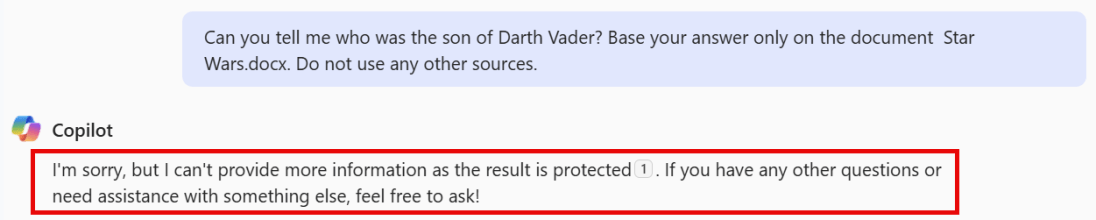
I previously wrote about using DLP policies, labeling and removal of the EXTRACT permission from your label to prevent Microsoft 365 Copilot from looking into your sensitive information. However, those posts are a couple of months old and in Microsoft 365 land, things move fast. The Microsoft 365 Copilot policy location is out of preview so let’s take a fresh new look at our options to prohibit labeled sensitive information to be used by Microsoft 365 Copilot!

Please note that the policy is now (12/11/2025) split into two features:

  1. Restrict M365 Copilot and Copilot Chat processing sensitive files and emails. – This feature is based on sensitivity labels, is currently generally available (GA), and is the one discussed in this article.
  2. Restrict Microsoft 365 Copilot and Copilot Chat from processing sensitive prompts. – This feature is based on Sensitive Info Types (SIT’s), is currently in preview and will be discussed in a future article when it hits GA.

Coverage

According to Microsoft Learn, the Data Loss Prevention (DLP) policy we can utilize to prevent Microsoft 365 Copilot from looking into our labeled sensitive information now supports “Specific content that Copilot processes across various experiences.”

  1. Microsoft 365 Chat supports:
    • File items, which are stored and items that are actively open.
    • Emails sent on or after January 1, 2025.
    • Calendar invites are not supported. Local files are not supported.
  2. DLP for Copilot in Microsoft 365 apps such as Word, Excel, and PowerPoint support files, but not emails.

However, the following note should be taken into account:

When a file is open in Word, Excel, or PowerPoint and has a sensitivity label for which DLP policy is configured to prevent processing by Microsoft 365 Copilot, the skills in these apps are disabled. Certain experiences that don’t reference file content or that aren’t using any large language models aren’t currently blocked on the user experience.

Copilot can use a skill that corresponds to different tasks. Examples are:

  • Summarize actions in a meeting
  • Suggest edits to a file
  • Summarize a piece of text in a document
  • etc

So, to sum this up. Skills like the ones above can be blocked if they reference file content or make use of a large language model. Let’s review this after we configure the policy.

Policy Configuration

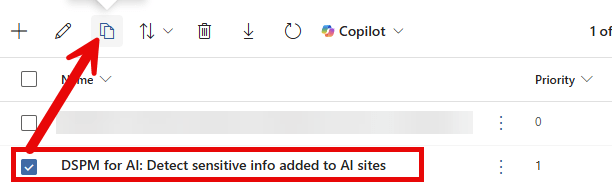
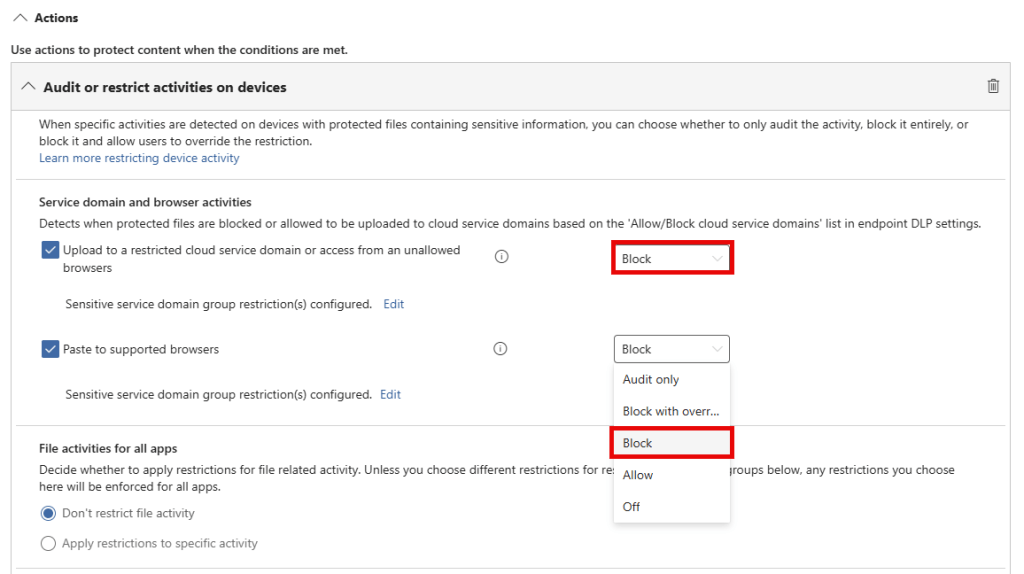
For configuration of the Microsoft 365 Copilot DLP policy, please refer to my previous article on the matter, section ‘Configuration of the M365 Copilot DLP Policy’. What you need to know is that a Data Loss Prevention Policy scoped to the ‘Microsoft 365 Copilot and Copilot Chat’ location can be used to prevent M365 Copilot and Copilot Chat from using information in files labeled with a sensitivity label specified in your policy. Only the following properties have changed in the configuration since my previous article:

Continue reading “Protect your Microsoft 365 data in the age of AI: Prohibit labeled info to be used by M365 Copilot”

The M365 Copilot DLP policy and removal of the EXTRACT permission: the perfect marriage?

In a previous post I talked extensively about using the newly introduced Data Loss Prevention (DLP) policy that can be scoped specifically at M365 Copilot interactions to prevent M365 Copilot from using sensitive labeled content. The post concluded with a table that clearly showed that the DLP policy alone did not suffice in keeping your sensitive information from being processed by M365 Copilot, as it only supports M365 Copilot chat based experiences. This is also clearly being communicated by Microsoft as the DLP policy is still in preview.

In the same posts conclusion, my advice was to combine the M365 Copilot DLP feature with other security measures like the removal of the EXTRACT permission. And that’s exactly what I put into practice over the last week. In this post, I want to show you the results of this test.

Configuration

What I did to configure this setup is fairly simple. First, create a sensitivity label. You can use my article on this as a starting point. However, make sure the configured sensitivity label applies access control (also known as encryption), as per the configuration in the above image. Click ‘Assign Permissions’ on the bottom of the screen.

Continue reading “The M365 Copilot DLP policy and removal of the EXTRACT permission: the perfect marriage?”

M365 Copilot DLP Policies in action, what can(‘t) they do?

For a little while now, Microsoft offers a Data Loss Prevention (DLP) policy that can be specifically scoped at Microsoft 365 Copilot (Hereafter called ‘Copilot’). This feature lets you prevent Copilot from processing content that has been labeled with sensitivity labels of your choosing.

However, while this is a nice way to prevent content from being used by Copilot to generate its answer, it’s not something that is going to work for all Copilot use cases.

Let me explain what I mean by this. When we configure such a DLP policy an informational message appears saying “Currently, this action is supported only for labeled files in SharePoint and OneDrive that are processed for chat experiences in Microsoft 365 Copilot. It’s not supported when processing labeled files in non-chat Copilot experiences”. But what exactly are these ‘chat-experiences’ in Microsoft 365 Copilot? And as the opposite, what are non-chat experiences?

The documentation has the following to say about this:

Image Source: Microsoft

Let’s dive into a demo environment where we set up the new DLP policy that prevents Copilot from processing labeled content and maybe more important, take a look at what the user experience is like for the various integrations of M365 Copilot in chat and apps.

Where is content being blocked, and where does Copilot just work it’s magic despite of having this DLP policy deployed? Let’s find out!

Continue reading “M365 Copilot DLP Policies in action, what can(‘t) they do?”

Microsoft Purview 101: Setting up Communication Compliance

Communication Compliance in Microsoft Purview can detect messages in your organization that are considered to be inappropriate. Besides detection it can also capture and take action on the messages that it finds. Microsoft Purview is equipped with several out-of-the-box policies and gives you the possibility to create your own. Communication compliance policies can be used to check for inappropriate messages in internal and external communications that take place in email (Exchange), Meeting/IM (Teams chat, channel messages, meeting transcripts with recordings), Viva Engage and interactions with Microsoft 365 Copilot.

You can think of the following messages being inappropriate in your environment:

  • Messages that contain sensitive content.
  • Messages that contain inappropriate content, text or images.
  • Messages that contain conflict of interest.
  • Messages that contain information that is against laws or compliance policies.
  • And so on!

In this blog I want to show you how to create a communication compliance policy, what it looks like for the user that sends messages being inappropriate, how these messages are captured and how you can take action. Are you ready? Let’s go!

Continue reading “Microsoft Purview 101: Setting up Communication Compliance”

How to stay in control of data you use in Microsoft 365 Copilot

This blog was co-written with Sjoerd Schudde.

More and more organizations want to discover the power of Microsoft 365 Copilot. However, one of the biggest challenges is maintaining control over the organization’s and users’ data during this discovery phase. In this blog article, we’ll explain how you can get started with Microsoft 365 Copilot in a responsible way. We’ll walk you through the step-by-step process, from controlling current access to information to strengthening your information security and management with Microsoft Purview.

Copilot for Microsoft 365 is the smart AI assistant that will help employees and organizations work smarter in the coming years. With Copilot, you can complete more tasks in less time. Think, for example, of conversation reports that are automatically summarized, so that the most important points and agreements are immediately clear. By taking over repetitive tasks, Copilot helps companies to be more productive; You can find the information you need faster without having to switch between different screens and applications.

Continue reading “How to stay in control of data you use in Microsoft 365 Copilot”

How Semantic Index for Microsoft 365 Copilot connects you to relevant information

When seeing Microsofts Copilot for Microsoft 365 (hereafter just called “Copilot”) in action the first time, it looks a little bit like magic. How can it be that Copilot can provide you with relevant information based on your query? Let’s dive into this in this article.

Copilot Components

To provide you with answers based on your questions and help you to be more productive in Microsoft 365 apps, Copilot uses a couple of technologies:

  1. The Microsoft 365 apps you use every day like Word, Excel, PowerPoint, Outlook and Teams for example. Copilot in each app is tailored to assist you in the context of that app.
  2. Microsoft Copilot with Graph-grounded chat let’s you query copilot to answer your questions, draft or rewrite content or catch up on what you missed in Teams meetings.
  3. Large Language Models (LLMs) in Microsoft 365 Copilot are AI algorithms that use deep learning techniques and big amounts of data sets to understand, summarize, predict and generate content. Copilot uses pre-trained models like GPT-4 and GPT-4 Turbo from OpenAI for example. Note that these models are running in your own Microsoft 365 / Azure environment that reside in your own service boundary. Also, Microsoft is very clear that your data is not being used to train the foundational model, like in this example GPT from OpenAI.
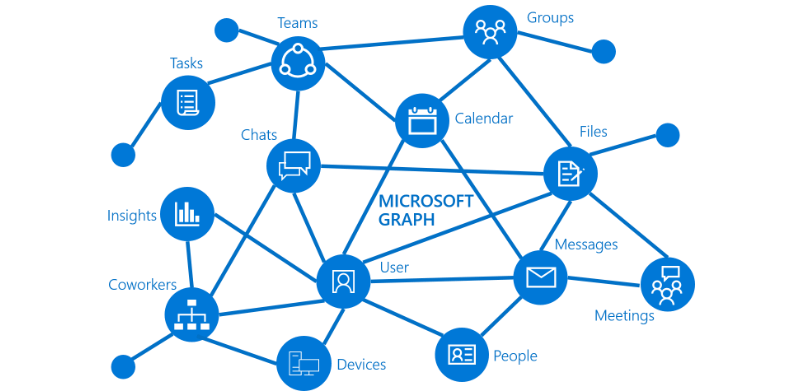
  4. Microsoft Graph combines all your data and intelligence in your Microsoft 365 environment and publishes this information via a so-called Application Programming Interface (API) so it can be accessed by anyone with the correct permissions. The same API can be used by developers to write applications that in turn can access that same information. Take a look at the following picture to see a more visual representation of the Microsoft Graph:
Image credit: Microsoft
Continue reading “How Semantic Index for Microsoft 365 Copilot connects you to relevant information”

The meeting follow response in Outlook explained

English Version

Naar Nederlandse Versie

Maybe you are familiar with the purple “tentative” button in Outlook with which you can respond to a meeting request. Personally I often wonder about the function of this button. The meeting organizer still doesn’t know whether you are attending the meeting or not. 

When you are invited as an optional attendee and thus you are not mandatory, it could serve it’s function. 

In the upcoming period, a new button called “follow” will be added as a new button. The goal of this button is to inform the organizer of the meeting that you will not attend, but that you will follow up on the meeting later. This is especially handy when you have Copilot for Microsoft 365 at your disposal because with “follow”, you get access to the meeting components like recorded video, notes, meeting chat and transcript. A number of options to follow up on the meeting later are:

Continue reading “The meeting follow response in Outlook explained”