Protect your Microsoft 365 data in the age of AI: Licensing

Up to now, the ‘Protect Your Microsoft 365 Data in the Age of AI’ series consists of the following posts:

  1. Protect your Microsoft 365 data in the age of AI: Introduction
  2. Protect your Microsoft 365 data in the age of AI: Prerequisites
  3. Protect your Microsoft 365 data in the age of AI: Gaining Insight
  4. Protect your Microsoft 365 data in the age of AI: Licensing (This post)

Every series has at least one episode that you feel was the weakest of the bunch; however, the series would not be complete without it. The same applies to this post. Although it is, of course, much more enjoyable to delve into the technical aspects, we must also address the more essential matters, such as licensing in this case. After all, before you begin protecting your data in the age of AI, you naturally want to know what it will cost you, so that you can perhaps draft a business case.

In the case of protecting your Microsoft 365 data in the age of AI, we’ll have to deal with 2 types of licensing models, which we’ll talk about in the next chapters.

Per-user licensing model

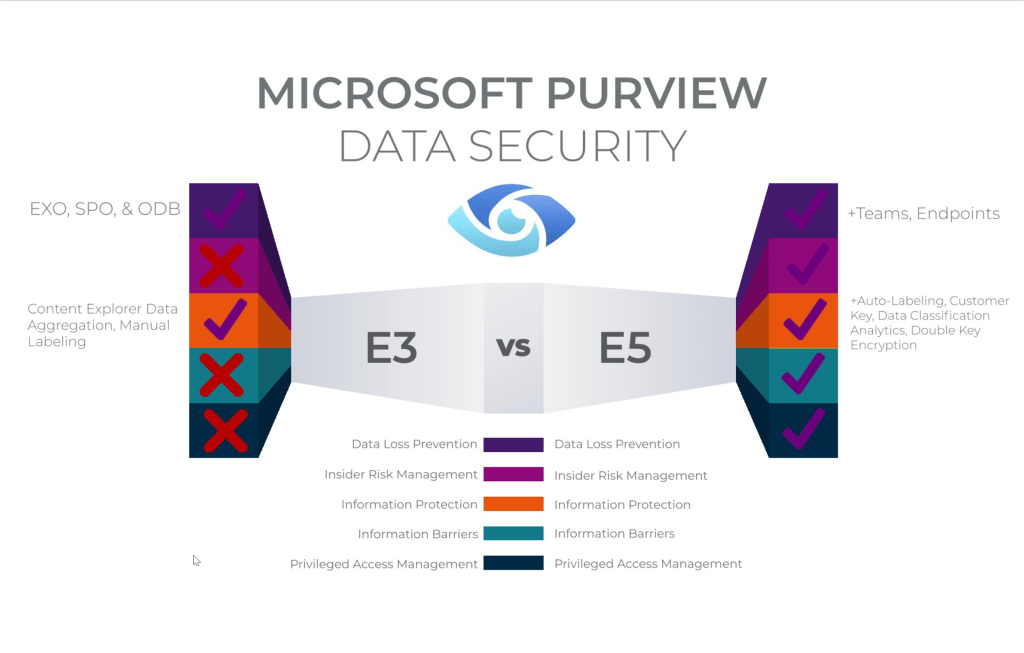
This is the actual subscription-based license that grants you the right to use Microsoft 365 services, and in this case, Microsoft Purview and Microsoft Defender for Cloud Apps.

Image source: Matthew Silcox
Continue reading “Protect your Microsoft 365 data in the age of AI: Licensing”

Protect your Microsoft 365 data in the age of AI: Gaining Insight

Up to now, the ‘Protect Your Microsoft 365 Data in the Age of AI’ series consists of the following posts:

  1. Protect your Microsoft 365 data in the age of AI: Introduction
  2. Protect your Microsoft 365 data in the age of AI: Prerequisites
  3. Protect your Microsoft 365 data in the age of AI: Gaining Insight (This post)

Now, with the introduction and prerequisites being taken care of, we can focus on the first objective in this blog series which -if you might remember- is the following:

Create insight in the use of GenAI apps in our company.

While this is possible by leveraging Microsoft Defender for Cloud Apps, we’re going to take this one step further and use Microsoft Purview Data Security Posture Management for AI (DSPM4AI) to also create insight on which sensitive data is shared with GenAI apps.

Creating policies

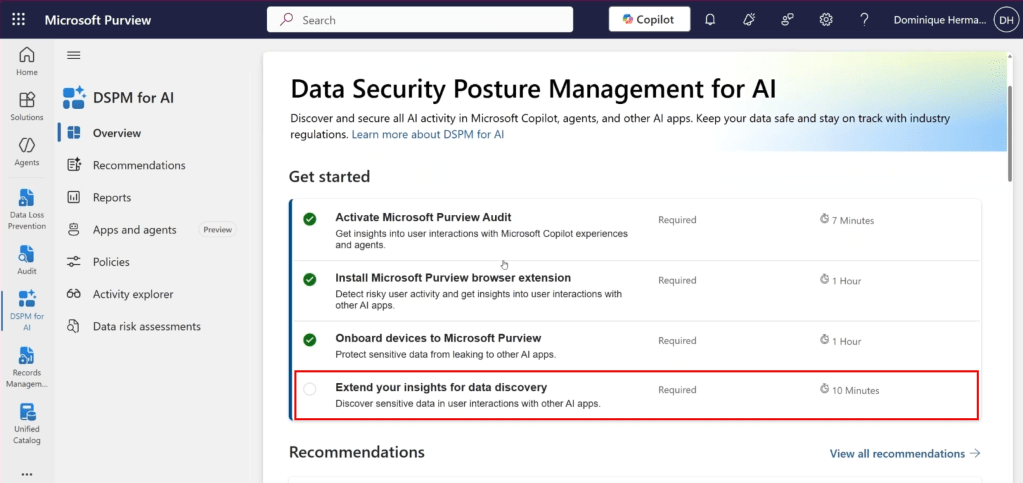
Let’s dive back into the Purview console and start where we also started with our previous article in this series. The DSPM4AI console. While we satisfied all the prerequisites in our previous article, we can see in the screenshot above that 1 tick box is still missing that satisfying green checkmark. And that’s the one we are going to enable right now.

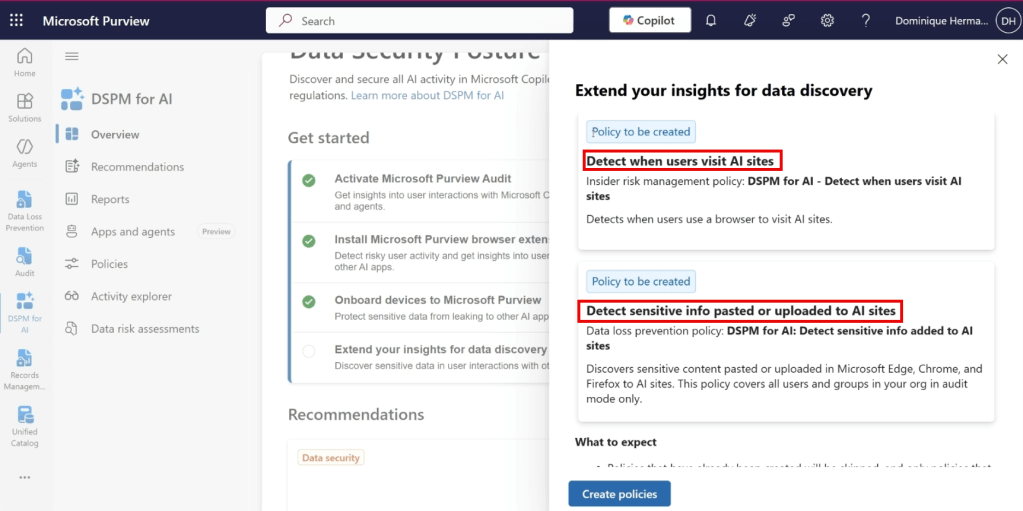
It allows us to extend our insights for data discovery and specifically; the use of generative AI apps in our organization. As can be seen in the screenshot above, it takes the manual creation of policies out of our hands by creating an Insider Risk Management policy that allows us to detect when users use a browser to visit AI sites and also creates an endpoint Data Loss Prevention (eDLP) policy that allows us to capture when and which sensitive information is pasted or uploaded to AI sites. Let’s create both policies and check out what’s under the hood.

Continue reading “Protect your Microsoft 365 data in the age of AI: Gaining Insight”

Protect your Microsoft 365 data in the age of AI: Prerequisites

In the previous blog post in this series we introduced the ‘Protect Your Microsoft 365 Data in the Age of AI’ series, Data Security Posture Management for AI (DSPM4AI) and the fictional company that we will use to explain all the goodness Purview and other Microsoft 365 solutions have in store to help us address the concerns that we talk about in the first post.

Up to now, the ‘Protect Your Microsoft 365 Data in the Age of AI’ series consists of the following posts:

  1. Protect your Microsoft 365 data in the age of AI: Introduction
  2. Protect your Microsoft 365 data in the age of AI: Prerequisites (This post)

In the second post in the series, we will be taking a look at the prerequisites that we need to configure in order to make use of Microsoft Purview Data Security Posture Management for AI, Microsoft Defender for Endpoint and Microsoft Defender for Cloud Apps to meet our needs. If we add other Microsoft 365 solutions in this series, this blog post will be updated.

Prerequisites: Data Security Posture Management for AI

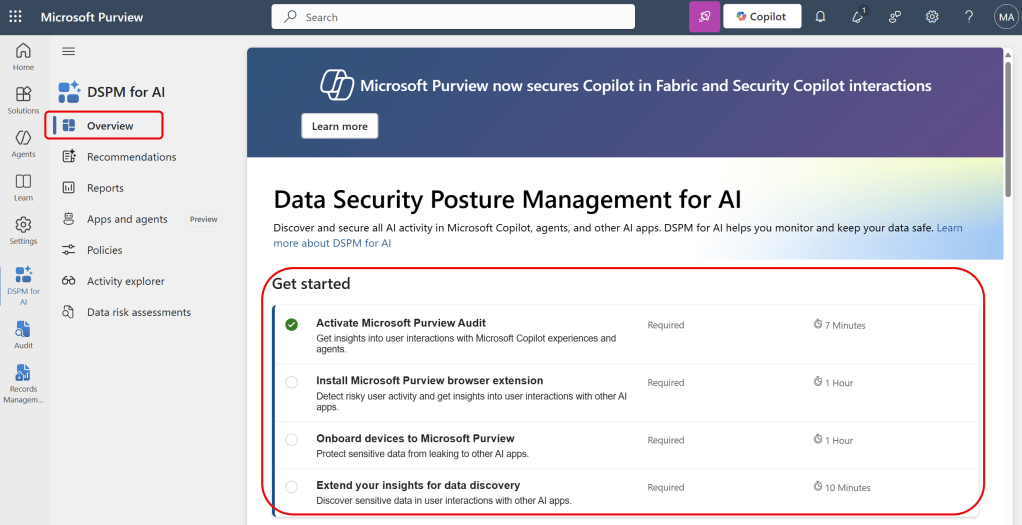
When navigating to the DSPM4AI solution in Microsoft Purview, we are greeted with a nice list of prerequisites we need to set up to get started.

Continue reading “Protect your Microsoft 365 data in the age of AI: Prerequisites”

Protect your Microsoft 365 data in the age of AI: Introduction

Introduction

In recent presentations I talked about protecting your data in the age of AI. This subject almost always comes together with a concern (at least when using AI professionally, in your home environment your mileage may vary). This concern is caused by various factors, from which i’ll highlight a few that relate to my expertise:

  • Having no insight on AI usage or (sensitive) company data that is shared with AI platforms .
  • Lacking awareness of what is done with your data and where it is stored (if at all).
  • Lack of knowledge on how to meet legal and regulatory requirements.
  • Not knowing how to make AI apps or platforms behave ethical.
  • The lack of knowledge on how to train your users on ethical AI usage.
  • Having no company policy on secure data usage and in particular secure AI usage.
  • Being unaware of the measures in your ecosystem that can be leveraged to create an insight on AI usage or maybe even take control of AI usage in your environment.

Of course the lack of transparency of AI apps doesn’t help in this regard. We often want to know how our data is processed and which data is stored or used by the developer of the app, where the case of the developer using your data to improve their large language model is the one that speaks to mind most.

The influence of GenAI at home

More and more employees are using generative AI tools to be more productive in their home environment. Customer products are packed with “AI” these days. While it’s often used as a buzzword to promote products, the fact is that a lot of companies are using GenAI to improve their users productivity. Examples are Google (Gemini in Android and their search service), Apple (Apple Intelligence in iOS), Microsoft (Copilot in Edge and their search service Bing) or more “independent” companies like OpenAI (ChatGPT) and Anthropic (Claude).

Continue reading “Protect your Microsoft 365 data in the age of AI: Introduction”

Purview on-demand classification explained

Introduction

Before you can make use of all features in Microsoft Purview, such as information protection and data loss prevention, it is essential to understand which information is sensitive for your organization and where this information is located within your organization. Identifying this sensitive information can be done in two ways: through (auto-)labeling or continuous classification based on document content characteristics.

When is classification information collected and where is it stored?

Image source: Enrique Saggese (Microsoft)

Let’s take a look at the image above by Enrique Saggese. Classification information is created or updated when 1 of the following actions happen to content:

Continue reading “Purview on-demand classification explained”

The M365 Copilot DLP policy and removal of the EXTRACT permission: the perfect marriage?

In a previous post I talked extensively about using the newly introduced Data Loss Prevention (DLP) policy that can be scoped specifically at M365 Copilot interactions to prevent M365 Copilot from using sensitive labeled content. The post concluded with a table that clearly showed that the DLP policy alone did not suffice in keeping your sensitive information from being processed by M365 Copilot, as it only supports M365 Copilot chat based experiences. This is also clearly being communicated by Microsoft as the DLP policy is still in preview.

In the same posts conclusion, my advice was to combine the M365 Copilot DLP feature with other security measures like the removal of the EXTRACT permission. And that’s exactly what I put into practice over the last week. In this post, I want to show you the results of this test.

Configuration

What I did to configure this setup is fairly simple. First, create a sensitivity label. You can use my article on this as a starting point. However, make sure the configured sensitivity label applies access control (also known as encryption), as per the configuration in the above image. Click ‘Assign Permissions’ on the bottom of the screen.

Continue reading “The M365 Copilot DLP policy and removal of the EXTRACT permission: the perfect marriage?”

Purview 101: Extend your Labeling needs to Windows Clients with the MPIP Client

For all your labeling needs on Windows clients, Microsoft provides us with the Microsoft Purview Information Protection (MPIP) client. This client extends the use of sensitivity labels in your organization for use on Windows clients. Your files can be anywhere on the client, it doesn’t have to be in a SharePoint, Teams or OneDrive location, it can just as easily be on the local harddrive.

The Microsoft Purview Information Protection client is in fact a collection of 4 tools:

  • The information protection file labeler. This tool is featured in this blog article. I will show you how to label files with it.
  • The information protection viewer which can be used to view encrypted files. This tool is also featured in this blog article.
  • The information protection scanner. Used to scan network shares and apply labels as per your liking. Will be featured in the next blog article.
  • The Microsoft Purview Information Protection PowerShell Module. Used to install and configure the information protection scanner and adjust sensitivity labels on files. Also featured in the next blog article.

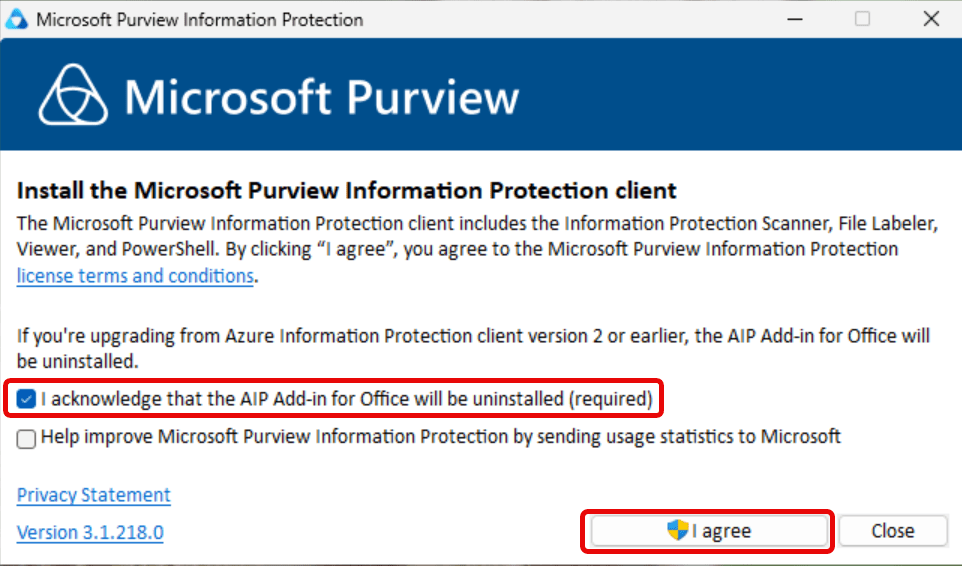
The MPIP Client replaces the old Azure Information Protection (AIP) unified labeling client. Be sure that you don’t rely on AIP before installing the MPIP client as it will uninstall the AIP client! This client also won’t install add-ins for sensitivity labeling in Office applications, as this is built-in the applications nowadays.

Before starting, make sure to take a look at the client requirements. If you run clients on Windows 11 ARM, make sure to check the note that this processor architecture is not supported. While it worked as designed in my lab environment, your mileage may vary. Also, the tool supports all languages that are supported by Office 365.

File type support

The MPIP client supports even more file types (extensions) than the ones found in the Microsoft 365 services. Support for all Office filetypes, PDF, Images, Photoshop and others are present. You can check the entire list at Microsoft Learn. Make sure to note that the supported file types differ between sensitivity labels with encryption and sensitivity labels without encryption.

Installation

Download the client from the Microsoft Download Center and execute the downloaded EXE or MSI file.

Continue reading “Purview 101: Extend your Labeling needs to Windows Clients with the MPIP Client”

M365 Copilot DLP Policies in action, what can(‘t) they do?

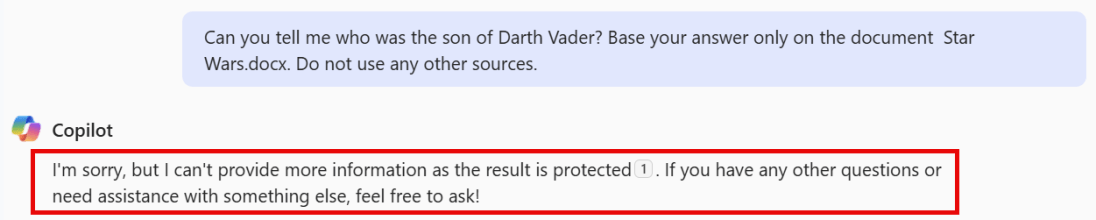
For a little while now, Microsoft offers a Data Loss Prevention (DLP) policy that can be specifically scoped at Microsoft 365 Copilot (Hereafter called ‘Copilot’). This feature lets you prevent Copilot from processing content that has been labeled with sensitivity labels of your choosing.

However, while this is a nice way to prevent content from being used by Copilot to generate its answer, it’s not something that is going to work for all Copilot use cases.

Let me explain what I mean by this. When we configure such a DLP policy an informational message appears saying “Currently, this action is supported only for labeled files in SharePoint and OneDrive that are processed for chat experiences in Microsoft 365 Copilot. It’s not supported when processing labeled files in non-chat Copilot experiences”. But what exactly are these ‘chat-experiences’ in Microsoft 365 Copilot? And as the opposite, what are non-chat experiences?

The documentation has the following to say about this:

Image Source: Microsoft

Let’s dive into a demo environment where we set up the new DLP policy that prevents Copilot from processing labeled content and maybe more important, take a look at what the user experience is like for the various integrations of M365 Copilot in chat and apps.

Where is content being blocked, and where does Copilot just work it’s magic despite of having this DLP policy deployed? Let’s find out!

Continue reading “M365 Copilot DLP Policies in action, what can(‘t) they do?”

How to secure SharePoint sites, Teams and their files against guest access

Allowing or blocking guest access to your teams is a common thing you need to think about when creating a team. Will you let the team’s owner be responsible for this fact or is this something you embed in your organization’s policy?

If we look at the options within Teams, we can generally only enable or disable guest access for the entire environment. But when we throw sensitivity labels into the equation we can:

  • Prevent team owners from adding guests.
  • Prevent items in a team from being shared with guests.

Note: This article applies sensitivity labels to containers (also referred to as container-level labeling), where the container in this case refers to the team and its underlying SharePoint site. Applying a sensitivity label at the container level does NOT assign a sensitivity label to items (files) within the container. This means that individuals can still download a file and distribute it by other means. If you want to prevent this, you can use item-level sensitivity labels.

Let’s take a look at how to configure container-level labeling to prevent guests from being added to a team and prevent items in the team from being shared with people outside your organization.

Prepare your environment for container-level labeling, the Microsoft Graph part.

Microsoft Teams teams are built on Microsoft 365 groups. Your Microsoft 365 Entra ID environment contains various so-called ‘settings objects’ that define how a Microsoft 365 group is configured. By default, these settings objects are not visible, as your environment is configured with default values.

Continue reading “How to secure SharePoint sites, Teams and their files against guest access”

Microsoft Purview 101: Howto setup Insider Risk Management (IRM)

Let’s talk about the following scenario. You have an employee that is leaving your company. Because the leaving employee thinks that he has the rights to all of the companies documents he starts downloading them for later use and sends the documents to his private email account using Dropbox. Wouldn’t you want to be notified of such a scenario?

Enter Microsoft Purview Insider Risk Management (IRM). A solution that collects information from all kinds of different sources like Microsoft 365 and perhaps other services like your HR-system. In IRM, you can create various policies that let you monitor all sorts of policy violations. A few examples are:

  • Data theft by departing users
  • Various kinds of data leaks
  • Various kinds of policy violations
  • Health record misuse
  • Risky browser usage

IRM provides you with workflows to help your organization detect the above potential risks, manage them by cases and take various actions on the risks that are found in your environment. Ready to find out more by using an example? Let’s go!

Prerequisites

When you first navigate to the IRM console, you are greeted with a few recommendations to get you started.

Turn on analytics

The first one is shown in the picture above and let’s you turn on analytics to scan for potential risks. When you enable this, user activities are scanned on a daily basis to identify potential risks occurring in you environment. The first scan can take 48 hours to complete as it scans your audit log and Microsoft Entra ID. When it’s done, it provides you with an email when there are insights and IRM policy recommendations to check up on. Note that if you don’t have audit logging enabled for your tenant (which is enabled by default nowadays) now is a good time to do so.

Continue reading “Microsoft Purview 101: Howto setup Insider Risk Management (IRM)”