Up to now, the ‘Protect Your Microsoft 365 Data in the Age of AI’ series consists of the following posts:
- Protect your Microsoft 365 data in the age of AI: Introduction
- Protect your Microsoft 365 data in the age of AI: Prerequisites
- Protect your Microsoft 365 data in the age of AI: Gaining Insight
- Protect your Microsoft 365 data in the age of AI: Licensing (This post)
Every series has at least one episode that you feel was the weakest of the bunch; however, the series would not be complete without it. The same applies to this post. Although it is, of course, much more enjoyable to delve into the technical aspects, we must also address the more essential matters, such as licensing in this case. After all, before you begin protecting your data in the age of AI, you naturally want to know what it will cost you, so that you can perhaps draft a business case.
In the case of protecting your Microsoft 365 data in the age of AI, we’ll have to deal with 2 types of licensing models, which we’ll talk about in the next chapters.
Per-user licensing model
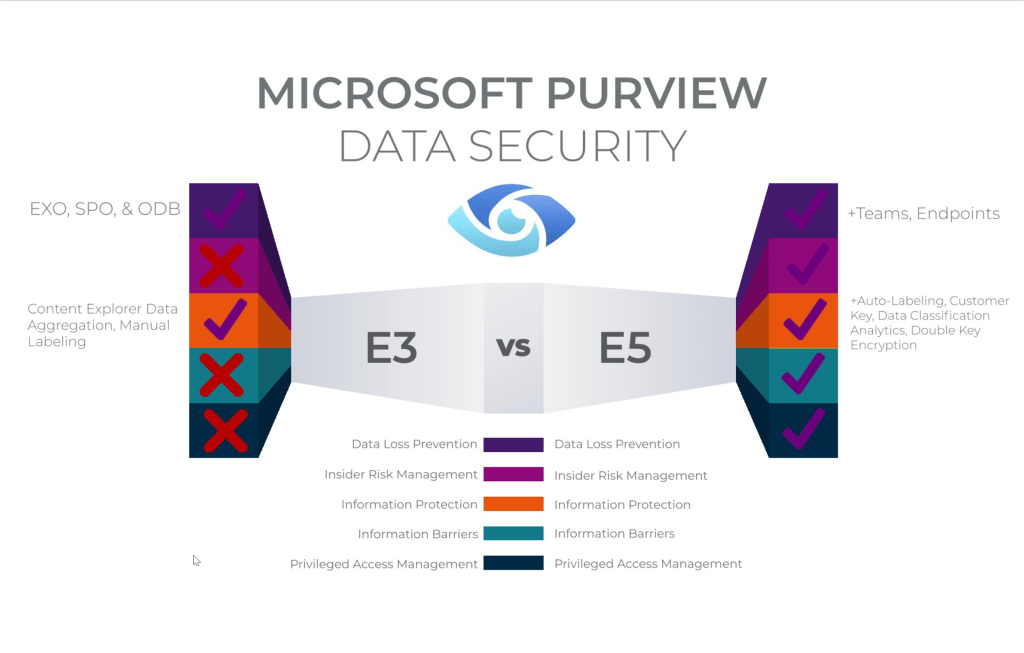
This is the actual subscription-based license that grants you the right to use Microsoft 365 services, and in this case, Microsoft Purview and Microsoft Defender for Cloud Apps.