
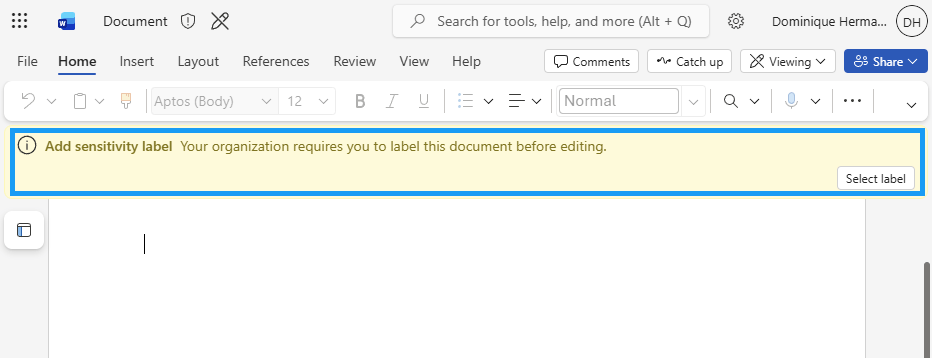
You might be familiar with the option to make labeling mandatory in your environment. This is an option you can set when creating a label publishing policy and is called ‘Require users to apply a label to their emails and documents’ and requires users to label a document for example before it can be saved. An example is shown in the image above.
While this can be a great addition to the labeling strategy for your organization, it may present you with certain challenges when your users often work as guest users in another organizations Microsoft 365-tenant.
Since the label publishing policy (including its ‘mandatory labeling’ setting) is distributed to your user accounts, this also applies when those users work as guests in another organization’s tenant.
Challenges that arise are the following:
- Users are required to apply a label to emails and documents in the guest tenant, just as they would in their home tenant.
- Labels presented in the guest tenant are those of the user’s home tenant (the tenant where the user’s account originally resides).
- As a result, documents in a guest tenant must be labeled using a sensitivity label from the user’s home tenant.
Practically speaking, this confuses end users, and it gets worse when guest tenant documents end up encrypted with labels from the user’s home tenant.
Currently, there is no configuration option to restrict a sensitivity label policy to your own tenant, so this is worth addressing during the design phase.
Possible alternatives:
- Do not enforce mandatory labeling for users operating as guests in other organizations’ tenants. Exercise particular caution when publishing labels that apply access control (encryption), as this can create significant challenges for users in the guest tenant. Instead, use alternative forms of security (for example default labeling tied to a certain SP library or auto-labeling based on SITs)
- Educate users on the use of sensitivity labels and the distinction between their own organization’s M365 tenant and that of others. Also define and communicate a clear strategy users can follow when they encounter this situation.
I will update this post if a more practical solution becomes available.


