Protect Your Microsoft 365 data in the age of AI: Block Access to Generative AI sites

Up to now, the ‘Protect Your Microsoft 365 Data in the Age of AI’ series consists of the following posts:

  1. Protect your Microsoft 365 data in the age of AI: Introduction
  2. Protect your Microsoft 365 data in the age of AI: Prerequisites
  3. Protect your Microsoft 365 data in the age of AI: Gaining Insight
  4. Protect your Microsoft 365 data in the age of AI: Licensing
  5. Protect your Microsoft 365 data in the age of AI: Prohibit labeled info to be used by M365 Copilot
  6. Protect Your Microsoft 365 data in the age of AI: Prevent sensitive data from being shared with 3rd party AI
  7. Protect Your Microsoft 365 data in the age of AI: Block Access to Generative AI sites

In the previous article in this series, we looked into protecting your organization against oversharing of information in third party generative AI applications. In this article, we will be taking a look at how we can leverage Microsoft Defender for Cloud Apps (or MDA as its often called) to completely block access to generative AI sites so you can build a layered approach to protect your organization against the risk of generative AI sites and oversharing.

Let’s first dive into a little bit of configuration and theory on Microsoft Defender for Cloud Apps by using the portal as our guide. Make sure you understand and took care of meeting the prerequisites, as outlined in the identically named article.

Continue reading “Protect Your Microsoft 365 data in the age of AI: Block Access to Generative AI sites”

Protect Your Microsoft 365 data in the age of AI: Prevent sensitive data from being shared with 3rd party AI

Up to now, the ‘Protect Your Microsoft 365 Data in the Age of AI’ series consists of the following posts:

  1. Protect your Microsoft 365 data in the age of AI: Introduction
  2. Protect your Microsoft 365 data in the age of AI: Prerequisites
  3. Protect your Microsoft 365 data in the age of AI: Gaining Insight
  4. Protect your Microsoft 365 data in the age of AI: Licensing
  5. Protect your Microsoft 365 data in the age of AI: Prohibit labeled info to be used by M365 Copilot
  6. Protect Your Microsoft 365 data in the age of AI: Prevent sensitive data from being shared with 3rd party AI (This post).

Welcome back to the next chapter of this blog series on protecting your Microsoft 365 data in the age of AI! This time, we’re going to take a look at how easy it is really to set up policies that prevent our sensitive data from being shared with 3rd party AI.

The quick route

I would like to present you with a shortcut first you can take to block the sensitive information of your choice for 3rd party generative AI sites. This will let you create a quick policy that is applied to every user in your organization to prevent them from uploading or pasting information to generative AI sites. This solution is based on Endpoint DLP. If you need a more custom setup leveraging functionality such as Adaptive Protection or Inline protection in Microsoft Edge, please skip this chapter.

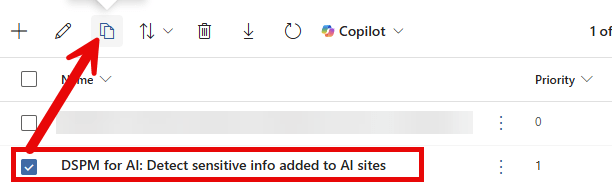
To start with the quick route, make your way to the Purview portal, Solutions, Data Loss Prevention. If you have followed the initial parts of this blog series, you will have created a policy through the blog ‘Gaining Insight‘ to gain insight into sensitive information shared with third-party Gen AI sites. If you have not followed that part, you must create the policies mentioned in that post before proceeding. You should have a DLP policy called ‘DSPM for AI: Detect sensitive info added to AI sites’.

Select that policy and create a copy. Give it a name of your choosing and make your way to the ‘Customize advanced DLP rules’ screen. Change the policy rule name so it won’t be a duplicate of the policy rule that’s already present and edit the policy rule.

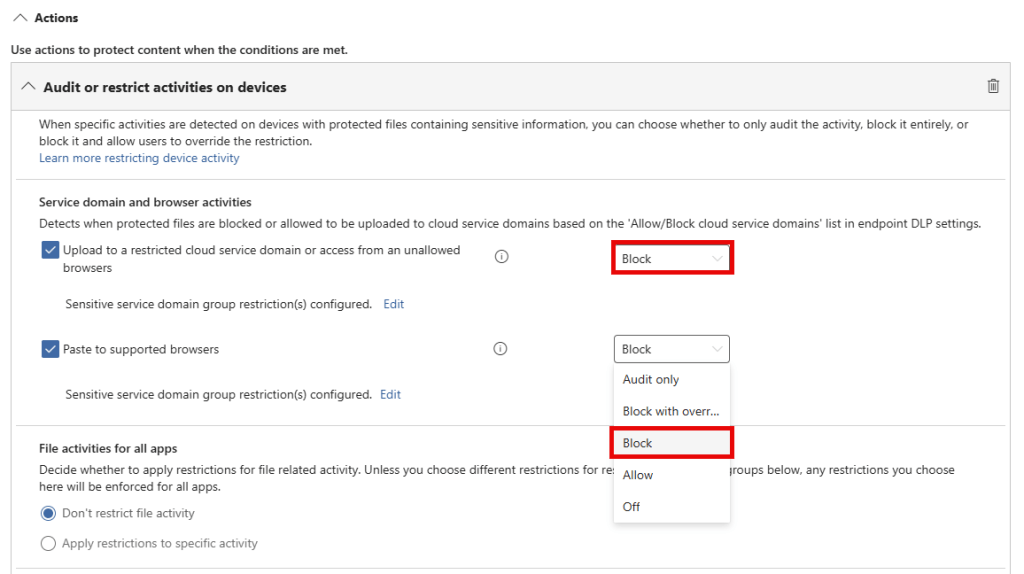
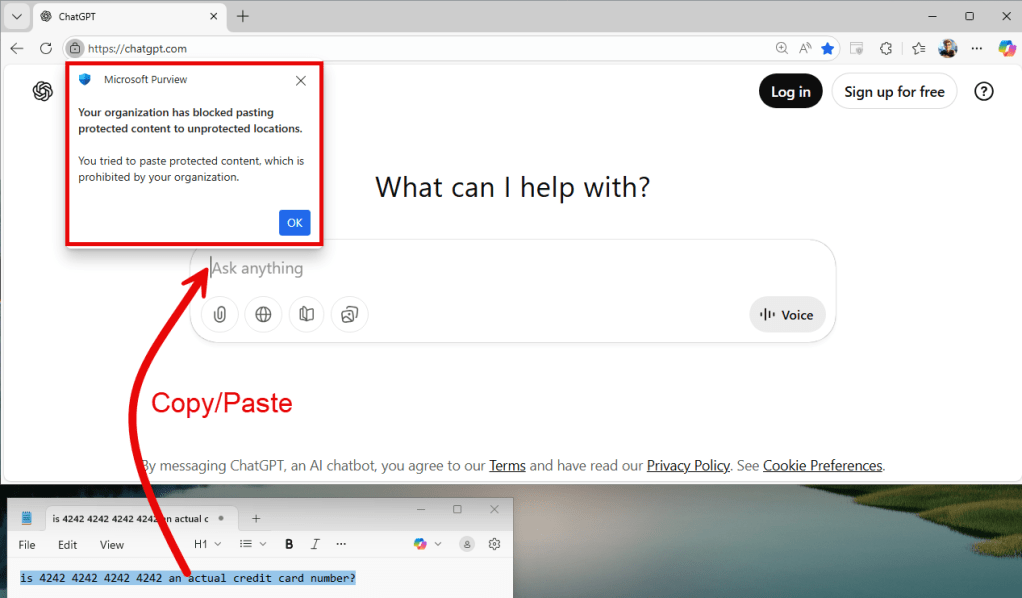
Make your way to the ‘Actions’ section, and configure ‘upload to a restricted cloud service domain’ and ‘paste to supported browsers’ to ‘block’. That’s all there is to it! Before enabling this policy, do note that it actually starts blocking the defined sensitive info from being uploaded or pasted to all supported generative AI sites.

The quick route – final result

Continue reading “Protect Your Microsoft 365 data in the age of AI: Prevent sensitive data from being shared with 3rd party AI”

Data Security: An Organization-Wide Mindset, Not a Project Milestone

Data does not move by itself; people move data.

This statement may seem simple, but it contains an important insight into data security: technology is only part of the solution. For robust information security, a proper balance is needed between technology that aligns with your organization and employees who know how to handle data securely. In this blog, I’ll share three practical tips to structurally strengthen the human aspect of data security, based on experience in various projects.

1. Form a Diverse Working Group

For your data security initiative, assemble a working group with people from different departments, roles, and backgrounds. Include data owners, department heads, the Chief Information Security Officer (CISO), and representatives from the Central Data Office (CDO), information security, and Document Information Management. This provides insight into information and information flows within your organization. Additionally, expand the group with representatives from IT and functional support.

After all, these are the people that have the real insight on what data is sensitive to your company, and what the specifications or properties of that data are.

2. Make End Users Part of the Design

Automatic detection of sensitive data and targeted alerts for risky actions help raise awareness among end users and support the adoption of data security. However, successful implementation depends on involving users. Start with training that strengthens both knowledge and desired behavior.

Continue reading “Data Security: An Organization-Wide Mindset, Not a Project Milestone”

Protect your Microsoft 365 data in the age of AI: Prohibit labeled info to be used by M365 Copilot

Up to now, the ‘Protect Your Microsoft 365 Data in the Age of AI’ series consists of the following posts:

  1. Protect your Microsoft 365 data in the age of AI: Introduction
  2. Protect your Microsoft 365 data in the age of AI: Prerequisites
  3. Protect your Microsoft 365 data in the age of AI: Gaining Insight
  4. Protect your Microsoft 365 data in the age of AI: Licensing
  5. Protect your Microsoft 365 data in the age of AI: Prohibit labeled info to be used by M365 Copilot (This post)

I previously wrote about using DLP policies, labeling and removal of the EXTRACT permission from your label to prevent Microsoft 365 Copilot from looking into your sensitive information. However, those posts are a couple of months old and in Microsoft 365 land, things move fast. The Microsoft 365 Copilot policy location is out of preview so let’s take a fresh new look at our options to prohibit labeled sensitive information to be used by Microsoft 365 Copilot!

Please note that the policy is now (12/11/2025) split into two features:

  1. Restrict M365 Copilot and Copilot Chat processing sensitive files and emails. – This feature is based on sensitivity labels, is currently generally available (GA), and is the one discussed in this article.
  2. Restrict Microsoft 365 Copilot and Copilot Chat from processing sensitive prompts. – This feature is based on Sensitive Info Types (SIT’s), is currently in preview and will be discussed in a future article when it hits GA.

Coverage

According to Microsoft Learn, the Data Loss Prevention (DLP) policy we can utilize to prevent Microsoft 365 Copilot from looking into our labeled sensitive information now supports “Specific content that Copilot processes across various experiences.”

  1. Microsoft 365 Chat supports:
    • File items, which are stored and items that are actively open.
    • Emails sent on or after January 1, 2025.
    • Calendar invites are not supported. Local files are not supported.
  2. DLP for Copilot in Microsoft 365 apps such as Word, Excel, and PowerPoint support files, but not emails.

However, the following note should be taken into account:

When a file is open in Word, Excel, or PowerPoint and has a sensitivity label for which DLP policy is configured to prevent processing by Microsoft 365 Copilot, the skills in these apps are disabled. Certain experiences that don’t reference file content or that aren’t using any large language models aren’t currently blocked on the user experience.

Copilot can use a skill that corresponds to different tasks. Examples are:

  • Summarize actions in a meeting
  • Suggest edits to a file
  • Summarize a piece of text in a document
  • etc

So, to sum this up. Skills like the ones above can be blocked if they reference file content or make use of a large language model. Let’s review this after we configure the policy.

Policy Configuration

For configuration of the Microsoft 365 Copilot DLP policy, please refer to my previous article on the matter, section ‘Configuration of the M365 Copilot DLP Policy’. What you need to know is that a Data Loss Prevention Policy scoped to the ‘Microsoft 365 Copilot and Copilot Chat’ location can be used to prevent M365 Copilot and Copilot Chat from using information in files labeled with a sensitivity label specified in your policy. Only the following properties have changed in the configuration since my previous article:

Continue reading “Protect your Microsoft 365 data in the age of AI: Prohibit labeled info to be used by M365 Copilot”

Protect your Microsoft 365 data in the age of AI: Licensing

Up to now, the ‘Protect Your Microsoft 365 Data in the Age of AI’ series consists of the following posts:

  1. Protect your Microsoft 365 data in the age of AI: Introduction
  2. Protect your Microsoft 365 data in the age of AI: Prerequisites
  3. Protect your Microsoft 365 data in the age of AI: Gaining Insight
  4. Protect your Microsoft 365 data in the age of AI: Licensing (This post)

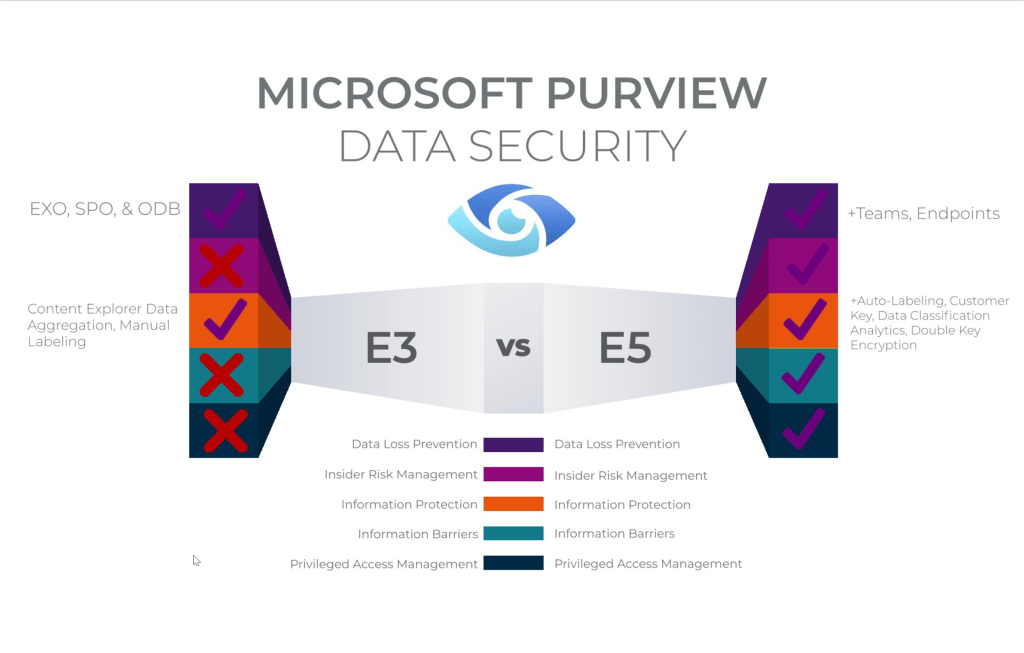
Every series has at least one episode that you feel was the weakest of the bunch; however, the series would not be complete without it. The same applies to this post. Although it is, of course, much more enjoyable to delve into the technical aspects, we must also address the more essential matters, such as licensing in this case. After all, before you begin protecting your data in the age of AI, you naturally want to know what it will cost you, so that you can perhaps draft a business case.

In the case of protecting your Microsoft 365 data in the age of AI, we’ll have to deal with 2 types of licensing models, which we’ll talk about in the next chapters.

Per-user licensing model

This is the actual subscription-based license that grants you the right to use Microsoft 365 services, and in this case, Microsoft Purview and Microsoft Defender for Cloud Apps.

Image source: Matthew Silcox
Continue reading “Protect your Microsoft 365 data in the age of AI: Licensing”

Protect your Microsoft 365 data in the age of AI: Gaining Insight

Up to now, the ‘Protect Your Microsoft 365 Data in the Age of AI’ series consists of the following posts:

  1. Protect your Microsoft 365 data in the age of AI: Introduction
  2. Protect your Microsoft 365 data in the age of AI: Prerequisites
  3. Protect your Microsoft 365 data in the age of AI: Gaining Insight (This post)

Now, with the introduction and prerequisites being taken care of, we can focus on the first objective in this blog series which -if you might remember- is the following:

Create insight in the use of GenAI apps in our company.

While this is possible by leveraging Microsoft Defender for Cloud Apps, we’re going to take this one step further and use Microsoft Purview Data Security Posture Management for AI (DSPM4AI) to also create insight on which sensitive data is shared with GenAI apps.

Creating policies

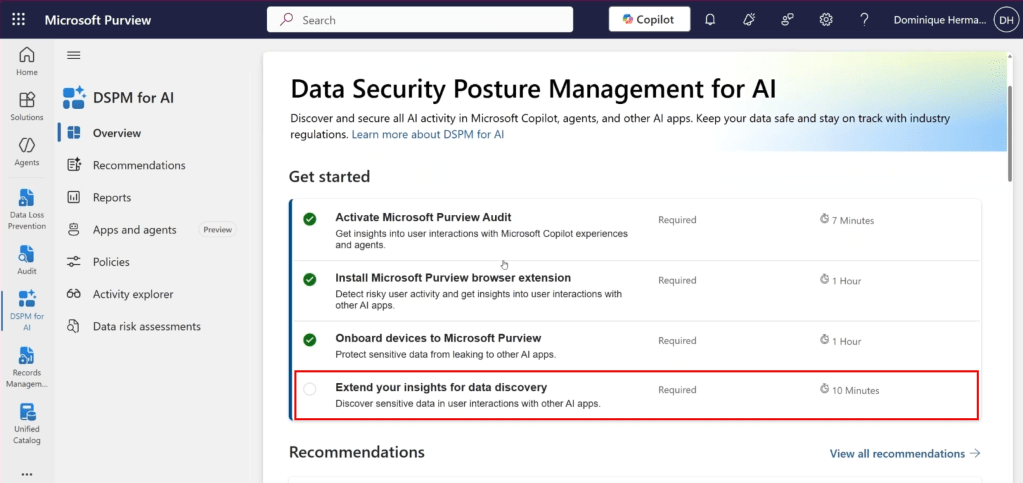
Let’s dive back into the Purview console and start where we also started with our previous article in this series. The DSPM4AI console. While we satisfied all the prerequisites in our previous article, we can see in the screenshot above that 1 tick box is still missing that satisfying green checkmark. And that’s the one we are going to enable right now.

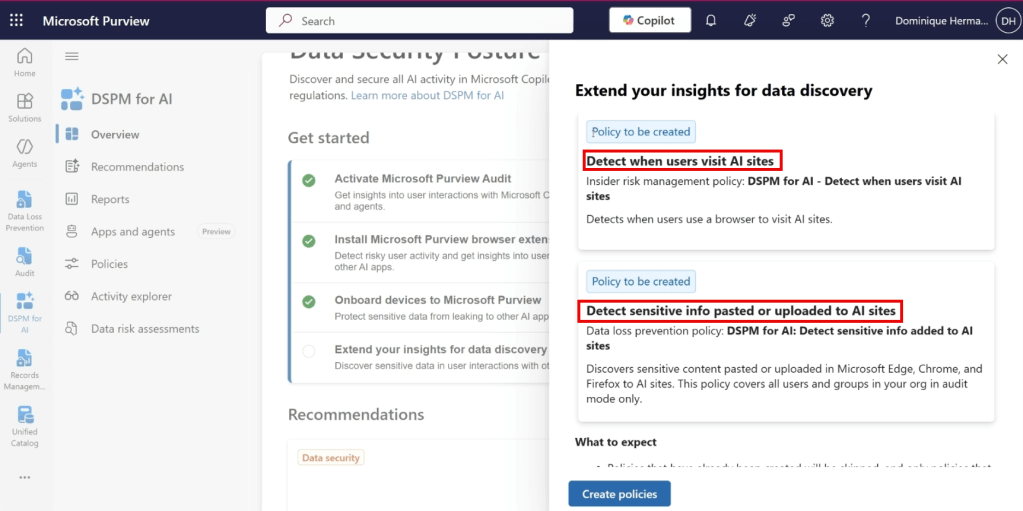
It allows us to extend our insights for data discovery and specifically; the use of generative AI apps in our organization. As can be seen in the screenshot above, it takes the manual creation of policies out of our hands by creating an Insider Risk Management policy that allows us to detect when users use a browser to visit AI sites and also creates an endpoint Data Loss Prevention (eDLP) policy that allows us to capture when and which sensitive information is pasted or uploaded to AI sites. Let’s create both policies and check out what’s under the hood.

Continue reading “Protect your Microsoft 365 data in the age of AI: Gaining Insight”

Protect your Microsoft 365 data in the age of AI: Prerequisites

In the previous blog post in this series we introduced the ‘Protect Your Microsoft 365 Data in the Age of AI’ series, Data Security Posture Management for AI (DSPM4AI) and the fictional company that we will use to explain all the goodness Purview and other Microsoft 365 solutions have in store to help us address the concerns that we talk about in the first post.

Up to now, the ‘Protect Your Microsoft 365 Data in the Age of AI’ series consists of the following posts:

  1. Protect your Microsoft 365 data in the age of AI: Introduction
  2. Protect your Microsoft 365 data in the age of AI: Prerequisites (This post)

In the second post in the series, we will be taking a look at the prerequisites that we need to configure in order to make use of Microsoft Purview Data Security Posture Management for AI, Microsoft Defender for Endpoint and Microsoft Defender for Cloud Apps to meet our needs. If we add other Microsoft 365 solutions in this series, this blog post will be updated.

Prerequisites: Data Security Posture Management for AI

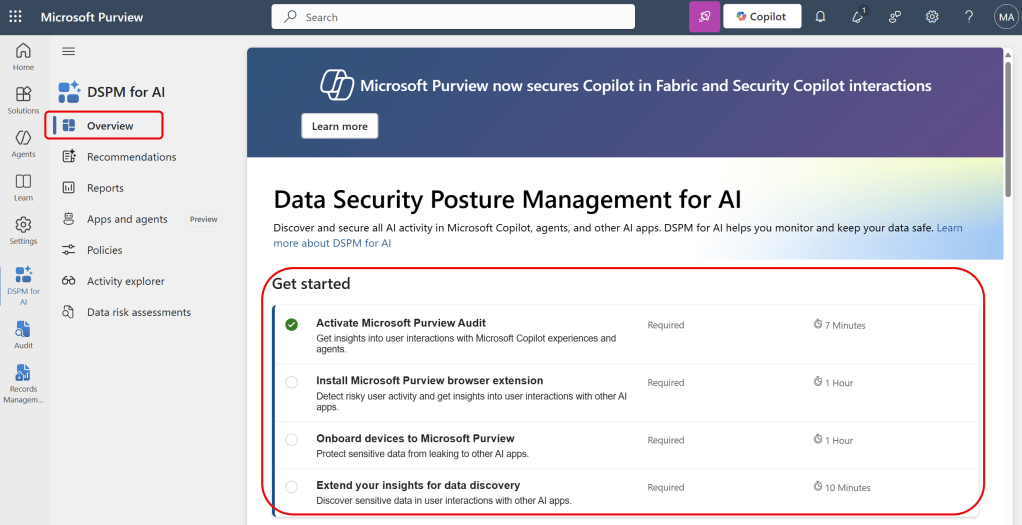
When navigating to the DSPM4AI solution in Microsoft Purview, we are greeted with a nice list of prerequisites we need to set up to get started.

Continue reading “Protect your Microsoft 365 data in the age of AI: Prerequisites”

Protect your Microsoft 365 data in the age of AI: Introduction

Introduction

In recent presentations I talked about protecting your data in the age of AI. This subject almost always comes together with a concern (at least when using AI professionally, in your home environment your mileage may vary). This concern is caused by various factors, from which i’ll highlight a few that relate to my expertise:

  • Having no insight on AI usage or (sensitive) company data that is shared with AI platforms .
  • Lacking awareness of what is done with your data and where it is stored (if at all).
  • Lack of knowledge on how to meet legal and regulatory requirements.
  • Not knowing how to make AI apps or platforms behave ethical.
  • The lack of knowledge on how to train your users on ethical AI usage.
  • Having no company policy on secure data usage and in particular secure AI usage.
  • Being unaware of the measures in your ecosystem that can be leveraged to create an insight on AI usage or maybe even take control of AI usage in your environment.

Of course the lack of transparency of AI apps doesn’t help in this regard. We often want to know how our data is processed and which data is stored or used by the developer of the app, where the case of the developer using your data to improve their large language model is the one that speaks to mind most.

The influence of GenAI at home

More and more employees are using generative AI tools to be more productive in their home environment. Customer products are packed with “AI” these days. While it’s often used as a buzzword to promote products, the fact is that a lot of companies are using GenAI to improve their users productivity. Examples are Google (Gemini in Android and their search service), Apple (Apple Intelligence in iOS), Microsoft (Copilot in Edge and their search service Bing) or more “independent” companies like OpenAI (ChatGPT) and Anthropic (Claude).

Continue reading “Protect your Microsoft 365 data in the age of AI: Introduction”

Purview on-demand classification explained

Introduction

Before you can make use of all features in Microsoft Purview, such as information protection and data loss prevention, it is essential to understand which information is sensitive for your organization and where this information is located within your organization. Identifying this sensitive information can be done in two ways: through (auto-)labeling or continuous classification based on document content characteristics.

When is classification information collected and where is it stored?

Image source: Enrique Saggese (Microsoft)

Let’s take a look at the image above by Enrique Saggese. Classification information is created or updated when 1 of the following actions happen to content:

Continue reading “Purview on-demand classification explained”

The M365 Copilot DLP policy and removal of the EXTRACT permission: the perfect marriage?

In a previous post I talked extensively about using the newly introduced Data Loss Prevention (DLP) policy that can be scoped specifically at M365 Copilot interactions to prevent M365 Copilot from using sensitive labeled content. The post concluded with a table that clearly showed that the DLP policy alone did not suffice in keeping your sensitive information from being processed by M365 Copilot, as it only supports M365 Copilot chat based experiences. This is also clearly being communicated by Microsoft as the DLP policy is still in preview.

In the same posts conclusion, my advice was to combine the M365 Copilot DLP feature with other security measures like the removal of the EXTRACT permission. And that’s exactly what I put into practice over the last week. In this post, I want to show you the results of this test.

Configuration

What I did to configure this setup is fairly simple. First, create a sensitivity label. You can use my article on this as a starting point. However, make sure the configured sensitivity label applies access control (also known as encryption), as per the configuration in the above image. Click ‘Assign Permissions’ on the bottom of the screen.

Continue reading “The M365 Copilot DLP policy and removal of the EXTRACT permission: the perfect marriage?”